Mostrando las entradas con la etiqueta Karina. Mostrar todas las entradas

martes, 23 de mayo de 2017

Tarea sombras

Captura:

Código:
#include <windows.h>
#include <C:\GLUT\include\GL\glut.h
#include <stdlib.h>
#include <stdio.h>
#include <math.h>

GLfloat angle = 0,angle2 = 0;
int moving, startx, starty;
int alto=512,ancho=512;//dim imagen

unsigned char * textura;

static GLfloat posicionLuz[] = {12, 20, 12, 0.5};//x,y,z,luz posicional/direccional
static GLfloat planoPiso[4];
static GLfloat matSombra[4][4];

enum {X, Y, Z, W}; //calcular matriz
enum {A, B, C, D};//plano


/* Matriz de proyeccion de la sombra */
static GLfloat verticesPiso[4][3] = {
    { -50.0, 0.0,  50.0 },
    {  50.0, 0.0,  50.0 },
    {  50.0, 0.0, -50.0 },
    { -50.0, 0.0, -50.0 },
};


/* Ecuación del plano dados 3 puntos. */
void ecPlano(GLfloat plano[4],GLfloat v0[3], GLfloat v1[3], GLfloat v2[3])//donde lo voy a guaradr y 3 puntos cualquiera
{
    GLfloat vec0[3], vec1[3];
    /* Producto cruz entre 2 vectores. */
    vec0[X] = v1[X] - v0[X];
    vec0[Y] = v1[Y] - v0[Y];
    vec0[Z] = v1[Z] - v0[Z];

    vec1[X] = v2[X] - v0[X];
    vec1[Y] = v2[Y] - v0[Y];
    vec1[Z] = v2[Z] - v0[Z];

    /* Encontrar producto cruz para A, B, y C en la ec. del plano */
    plano[A] = vec0[Y] * vec1[Z] - vec0[Z] * vec1[Y];
    plano[B] = -(vec0[X] * vec1[Z] - vec0[Z] * vec1[X]);
    plano[C] = vec0[X] * vec1[Y] - vec0[Y] * vec1[X];

    plano[D] = -(plano[A] * v0[X] + plano[B] * v0[Y] + plano[C] * v0[Z]);
}

void matrizDsombra(GLfloat matrizSombra[4][4],GLfloat plano[4], GLfloat posLuz[4])
{   GLfloat punto;

    // Producto punto entre vector light position y la normal del plano
    punto = plano[X] * posLuz[X] + plano[Y] * posLuz[Y] +
        plano[Z] * posLuz[Z] + plano[W] * posLuz[W];

    matrizSombra[0][0] = punto - posLuz[X] * plano[X];
    matrizSombra[1][0] = 0 - posLuz[X] * plano[Y];
    matrizSombra[2][0] = 0 - posLuz[X] * plano[Z];
    matrizSombra[3][0] = 0 - posLuz[X] * plano[W];

    matrizSombra[X][1] = 0 - posLuz[Y] * plano[X];
    matrizSombra[1][1] = punto - posLuz[Y] * plano[Y];
    matrizSombra[2][1] = 0 - posLuz[Y] * plano[Z];
    matrizSombra[3][1] = 0 - posLuz[Y] * plano[W];

    matrizSombra[X][2] = 0 - posLuz[Z] * plano[X];
    matrizSombra[1][2] = 0 - posLuz[Z] * plano[Y];
    matrizSombra[2][2] = punto - posLuz[Z] * plano[Z];
    matrizSombra[3][2] = 0- posLuz[Z] * plano[W];

    matrizSombra[X][3] = 0 - posLuz[W] * plano[X];
    matrizSombra[1][3] = 0 - posLuz[W] * plano[Y];
    matrizSombra[2][3] = 0 - posLuz[W] * plano[Z];
    matrizSombra[3][3] = punto - posLuz[W] * plano[W];

}


void aplicarMaterialBronce(int encendido) //es color verde esmeralda
{
    if(encendido==1) {
            //estos primeros son los parametros
        GLfloat mat_green_ambient[] = {0.2125,0.1275,0.054,0.75};//ambiente y la ultima es alfa transaparencia
        GLfloat mat_green_diffuse[] = { 0.714,0.4284,0.18144,0.75};//difuso
        GLfloat mat_specular[] = { 0.393548,0.271906,0.166721,0.5};//especular r,g,b y alfa
        GLfloat mat_shininess[] = { 0.2}; //128 mucho brillo y 0 poco brillo

        glMaterialfv(GL_FRONT, GL_SPECULAR, mat_specular); //se aplica solo en la cara frontal gl_front and back
        glMaterialfv(GL_FRONT, GL_SHININESS, mat_shininess);
        glMaterialfv(GL_FRONT, GL_AMBIENT, mat_green_ambient);
        glMaterialfv(GL_FRONT, GL_DIFFUSE, mat_green_diffuse);
    }
}

void aplicarMaterialVerde(int encendido) //es color verde esmeralda
{
    if(encendido==1) {
            //estos primeros son los parametros
        GLfloat mat_green_ambient[] = {0.0,0.0,0.0,0.75};//ambiente y la ultima es alfa transaparencia
        GLfloat mat_green_diffuse[] = { 0.1,0.35,0.1,0.75};//difuso
        GLfloat mat_specular[] = { 0.45,0.55,0.45,0.5};//especular r,g,b y alfa
        GLfloat mat_shininess[] = { 0.25}; //128 mucho brillo y 0 poco brillo

        glMaterialfv(GL_FRONT, GL_SPECULAR, mat_specular); //se aplica solo en la cara frontal gl_front and back
        glMaterialfv(GL_FRONT, GL_SHININESS, mat_shininess);
        glMaterialfv(GL_FRONT, GL_AMBIENT, mat_green_ambient);
        glMaterialfv(GL_FRONT, GL_DIFFUSE, mat_green_diffuse);
    }
}


//se crea la figura del arbol
void arbol(void){
    //tronco
    glPushMatrix();
        aplicarMaterialBronce(1);
        glRotatef(270,1,0,0);
        glutSolidCone(0.7, 5.5, 100, 100);
    glPopMatrix();

    //rama principal
    glPushMatrix();
        aplicarMaterialVerde(1);
        glTranslatef(0,4.5,0);
        glutSolidDodecahedron();
    glPopMatrix();

    //tronco derecho
     glPushMatrix();
        aplicarMaterialBronce(1);
        glTranslatef(0,1.2,0);
        glRotatef(220,1,0,0);
        glutSolidCone(0.5, 2.5, 100, 100);
    glPopMatrix();

     //rama derecha
    glPushMatrix();
        aplicarMaterialVerde(1);
        glTranslatef(0,2.3,-1.5);
        glRotatef(220,1,0,0);
        glScalef(0.5,0.5,0.5);
        glutSolidDodecahedron();
    glPopMatrix();

    //tronco izquierdo
     glPushMatrix();
        aplicarMaterialBronce(1);
        glTranslatef(0,0.5,0);
        glRotatef(320,1,0,0);
        glutSolidCone(0.5, 2.5, 100, 100);
    glPopMatrix();

     //rama izquierda
    glPushMatrix();
        aplicarMaterialVerde(1);
        glTranslatef(0,2,1.5);
        glRotatef(220,1,0,0);
        glScalef(0.5,0.5,0.5);
        glutSolidDodecahedron();
    glPopMatrix();
}

void dibujaObjeto(void)
{
    glPushMatrix();
        //glTranslatef(0, 4, 0); lo comente para que el objeto estuviera sobre el piso
        GLfloat mat_p_ambient[] = {0.4725,0.4245,0.8645,1};
        GLfloat mat_p_diffuse[] = {0.34615,0.5143,0.8903,1};
        GLfloat mat_pspecular[] = {1.797357,1.723991,1.708006,1};
        GLfloat mat_pshininess[] = {18.2};

        glMaterialfv(GL_FRONT, GL_SPECULAR, mat_pspecular);
        glMaterialfv(GL_FRONT, GL_SHININESS, mat_pshininess);
        glMaterialfv(GL_FRONT, GL_AMBIENT, mat_p_ambient);
        glMaterialfv(GL_FRONT, GL_DIFFUSE, mat_p_diffuse);

        //se dibujan y se trasladan los arboles en todo el escenario
        glTranslatef(-30,0,9);
        arbol();
        glTranslatef(10,0,15);
        arbol();
        glTranslatef(30,0,20);
        arbol();
        glTranslatef(15,0,-20);
        arbol();
        glTranslatef(20,0,-3);
        arbol();
        glTranslatef(-25,0,-18);
        arbol();
        glTranslatef(-30,0,-25);
        arbol();

    glPopMatrix();
}


int leerImagen(){
    FILE *imagen;
    imagen=fopen("C:/Users/migue/Dropbox/8vo Semestre/Graficación/3D/TareaSombras/Piso.raw","r");
    textura=(unsigned char*)malloc(ancho*alto*3);
    if(imagen==NULL){
        printf("Error: No imagen");
        return 0;
    }
    fread(textura,ancho*alto*3,1,imagen);
    fclose(imagen);
    return 1;
}

void usarTextura(void)
{
    glTexParameteri(GL_TEXTURE_2D, GL_TEXTURE_MIN_FILTER, GL_NEAREST);
    glTexImage2D(GL_TEXTURE_2D, 0, GL_RGB, ancho, alto, 0, GL_RGB, GL_UNSIGNED_BYTE, textura);
}


void dibujaPiso(void)
{
    glDisable(GL_LIGHTING);
    glBegin(GL_QUADS);
    glTexCoord2f(0.0, 0.0); //se utiliza para dibujar la textura
    glVertex3fv(verticesPiso[0]);
    glTexCoord2f(0.0, 10);
    glVertex3fv(verticesPiso[1]);
    glTexCoord2f(10, 10);
    glVertex3fv(verticesPiso[2]);
    glTexCoord2f(10, 0.0);
    glVertex3fv(verticesPiso[3]);
    glEnd();
    glEnable(GL_LIGHTING);
}

void display(void)
{
    glClear(GL_COLOR_BUFFER_BIT | GL_DEPTH_BUFFER_BIT | GL_STENCIL_BUFFER_BIT);
    glPushMatrix();
        glRotatef(angle2, 1.0, 0.0, 0.0);/* mover mouse */
        glRotatef(angle, 0.0, 1.0, 0.0);
        glLightfv(GL_LIGHT0, GL_POSITION, posicionLuz);//posicion de laluz

        //glColor3f(0.1, 0.55, 0.55); se utiliza para el color del piso
        glEnable(GL_TEXTURE_2D); //se habilita la textura sobre el piso
        dibujaPiso();
        glDisable(GL_TEXTURE_2D);


        glDisable(GL_LIGHTING);//iluminacion
        glDisable(GL_DEPTH_TEST);

        glEnable(GL_BLEND);//transparencia
        glBlendFunc(GL_SRC_ALPHA, GL_ONE_MINUS_SRC_ALPHA);
        glPushMatrix();
                glColor4f(0.0, 0.0, 0.0, 1); //negro y .1 de transparencia
                glMultMatrixf((GLfloat *) matSombra);
                    dibujaObjeto();//Sombra
        glPopMatrix();

        glDisable(GL_BLEND);
        glEnable(GL_LIGHTING);
        glEnable(GL_DEPTH_TEST);

         dibujaObjeto();     //dibujo objeto original

            //si dibuja el circulo amarillo que simula el sol, es el objeto que le da iluminacion a los objetos
            glDisable(GL_LIGHTING); //esfera amarilla
            glTranslatef(posicionLuz[0], posicionLuz[1], posicionLuz[2]);
            glColor3f(1.0, 1.0, 0.0);
            glutSolidSphere(0.5, 10, 10);


    glPopMatrix();
glutSwapBuffers();
}

void mouse(int button, int state, int x, int y)
{
    if (button == GLUT_LEFT_BUTTON) {
        if (state == GLUT_DOWN) {moving = 1;startx = x;starty = y;}
        if (state == GLUT_UP) {moving = 0;}
    }
}

void mover(int x, int y)
{
    if (moving) {
        angle = angle + (x - startx);
        angle2 = angle2 + (y - starty);
        startx = x; starty = y;
        glutPostRedisplay();
    }
}


void init(void){

    glMatrixMode(GL_PROJECTION);
    gluPerspective(25.0,2.0,20.0,150.0);
    glMatrixMode(GL_MODELVIEW);
    gluLookAt(0.0, 8.0, 60.0,  /* vista en (0,8,60) */
              0.0, 8.0, 0.0,      /* centro en (0,8,0) */
              0.0, 1.0, 0.0);      /* altura en Y */

    glEnable(GL_LIGHTING);
    glEnable(GL_LIGHT0);
    glLightf(GL_LIGHT0, GL_CONSTANT_ATTENUATION, 2.5);


    leerImagen();
    usarTextura();

    glClearColor(0.80, 0.90, 0.93, 1);//color del fondo
    ecPlano(planoPiso, verticesPiso[1], verticesPiso[2], verticesPiso[3]);//Plano para sombra, ecuacion del plano,se guarda en plano piso
    matrizDsombra(matSombra, planoPiso, posicionLuz);    //matriz de la sombra recalcular?, matriz de pryexccion en matSombra
}

int main(int argc, char **argv)
{
    glutInit(&argc, argv);
    glutInitDisplayMode(GLUT_RGB | GLUT_DOUBLE | GLUT_DEPTH | GLUT_STENCIL | GLUT_MULTISAMPLE); //Stencial
    glutInitWindowSize(800, 400);
    glutCreateWindow("Arboles");
    glutDisplayFunc(display);
    glutMouseFunc(mouse);
    glutMotionFunc(mover);
    init();
    glutMainLoop();
    return 0;
}


jueves, 18 de mayo de 2017

Avance del Proyecto

Para el avance del proyecto se comenzó haciendo un boceto en una hoja con el fin del planear el modo más fácil de realizar el dibujado del escenario así como para la validación de los movimientos de los personajes del juego.
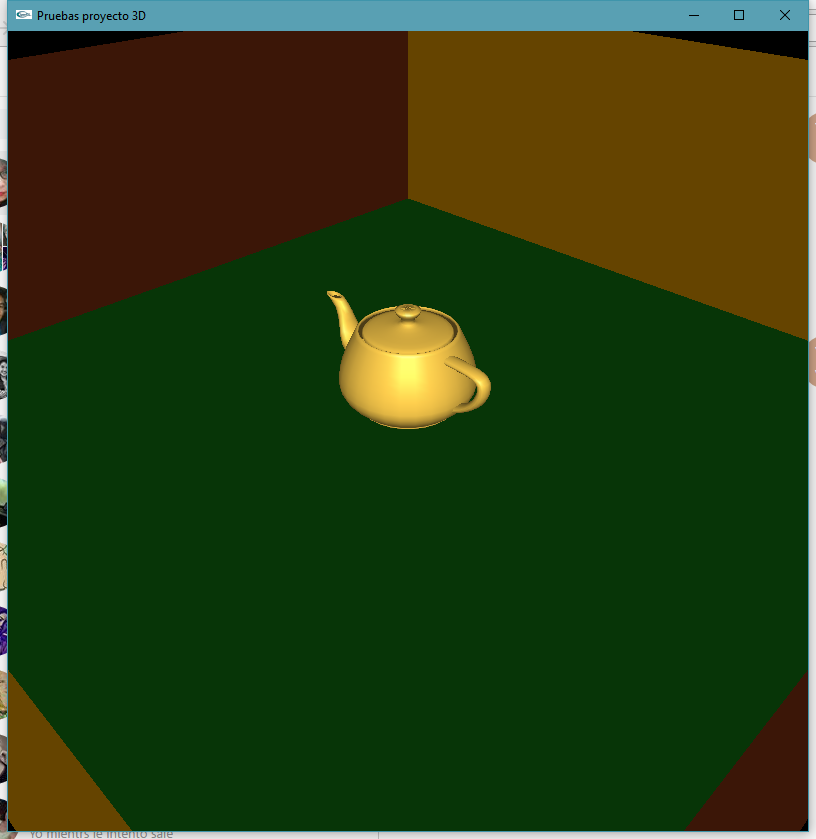
Después se realizaron pruebas de iluminación en un escenario con una tetera.
Por último se hizo un prototipo del personaje Hopmon y se realizó un prototipo del escenario.

Cronograma actualizado:

Boceto a mano:


Personaje Hopmon:


Pruebas de iluminación:


Prototipo del escenario:


lunes, 8 de mayo de 2017

Propuesta 2


Propuesta 2:
JUEGO HOPMON
Es un juego en el que se puede reutilizar el codigo del juego de PacaMan, adaptandolo ahora a las heramientas de 3D.

martes, 25 de abril de 2017

Cronograma y Propuesta del Proyecto

PROPUESTA DE PROYECTO: RECORRIDO VIRTUAL DE UNA PARTE DE MÉXICO

CubeMap - Caja de texturas

Capturas:


Código:
#include <windows.h>
#include <C:\GLUT\include\GL\glut.h>
#include <stdlib.h>
#include <stdio.h>
#include <string.h>
#include <math.h>

int alto=256,ancho=256;//dim imagen
GLfloat angle = 0;
GLfloat angle2 = 0;
int moving, startx, starty;


unsigned char * textura1;
unsigned char * textura2;
unsigned char * textura3;
unsigned char * textura4;
unsigned char * textura5;
unsigned char * textura6;

int leerImagen1(){
    FILE *imagen;
    imagen = fopen("C:/Users/migue/Dropbox/8vo Semestre/Graficación/3D/MapCubeFig/cMap1.raw","r");
    textura1 = (unsigned char*)malloc( ancho*alto*3 );
    if( imagen == NULL ){
        printf("Error: No imagen");
        return 0;
    }
    fread( textura1, ancho*alto*3, 1, imagen);
    fclose(imagen);
    return 1;
}

int leerImagen2(){
    FILE *imagen;
    imagen = fopen("C:/Users/migue/Dropbox/8vo Semestre/Graficación/3D/MapCubeFig/cMap2.raw","r");
    textura2 = (unsigned char*)malloc( ancho*alto*3 );
    if( imagen == NULL ){
        printf("Error: No imagen");
        return 0;
    }
    fread( textura2, ancho*alto*3, 1, imagen);
    fclose(imagen);
    return 1;
}

int leerImagen3(){
    FILE *imagen;
    imagen = fopen("C:/Users/migue/Dropbox/8vo Semestre/Graficación/3D/MapCubeFig/cMap3.raw","r");
    textura3 = (unsigned char*)malloc( ancho*alto*3 );
    if( imagen == NULL ){
        printf("Error: No imagen");
        return 0;
    }
    fread( textura3, ancho*alto*3, 1, imagen);
    fclose(imagen);
    return 1;
}

int leerImagen4(){
    FILE *imagen;
    imagen = fopen("C:/Users/migue/Dropbox/8vo Semestre/Graficación/3D/MapCubeFig/cMap4.raw","r");
    textura4 = (unsigned char*)malloc( ancho*alto*3 );
    if( imagen == NULL ){
        printf("Error: No imagen");
        return 0;
    }
    fread( textura4, ancho*alto*3, 1, imagen);
    fclose(imagen);
    return 1;
}

int leerImagen5(){
    FILE *imagen;
    imagen = fopen("C:/Users/migue/Dropbox/8vo Semestre/Graficación/3D/MapCubeFig/cMap5.raw","r");
    textura5 = (unsigned char*)malloc( ancho*alto*3 );
    if( imagen == NULL ){
        printf("Error: No imagen");
        return 0;
    }
    fread( textura5, ancho*alto*3, 1, imagen);
    fclose(imagen);
    return 1;
}

int leerImagen6(){
    FILE *imagen;
    imagen = fopen("C:/Users/migue/Dropbox/8vo Semestre/Graficación/3D/MapCubeFig/cMap6.raw","r");
    textura6 = (unsigned char*)malloc( ancho*alto*3 );
    if( imagen == NULL ){
        printf("Error: No imagen");
        return 0;
    }
    fread( textura6, ancho*alto*3, 1, imagen);
    fclose(imagen);
    return 1;
}

void usarTextura1(void)
{
    glTexParameteri(GL_TEXTURE_2D, GL_TEXTURE_MIN_FILTER, GL_NEAREST);
    glTexImage2D(GL_TEXTURE_2D, 0, GL_RGB, ancho, alto, 0, GL_RGB, GL_UNSIGNED_BYTE, textura1);
}


void usarTextura2(void)
{
    glTexParameteri(GL_TEXTURE_2D, GL_TEXTURE_MIN_FILTER, GL_NEAREST);
    glTexImage2D(GL_TEXTURE_2D, 0, GL_RGB, ancho, alto, 0, GL_RGB, GL_UNSIGNED_BYTE, textura2);
}


void usarTextura3(void)
{
    glTexParameteri(GL_TEXTURE_2D, GL_TEXTURE_MIN_FILTER, GL_NEAREST);
    glTexImage2D(GL_TEXTURE_2D, 0, GL_RGB, ancho, alto, 0, GL_RGB, GL_UNSIGNED_BYTE, textura3);
}


void usarTextura4(void)
{
    glTexParameteri(GL_TEXTURE_2D, GL_TEXTURE_MIN_FILTER, GL_NEAREST);
    glTexImage2D(GL_TEXTURE_2D, 0, GL_RGB, ancho, alto, 0, GL_RGB, GL_UNSIGNED_BYTE, textura4);
}


void usarTexturaBase(void)
{
    glTexParameteri(GL_TEXTURE_2D, GL_TEXTURE_MIN_FILTER, GL_NEAREST);
    glTexImage2D(GL_TEXTURE_2D, 0, GL_RGB, ancho, alto, 0, GL_RGB, GL_UNSIGNED_BYTE, textura5);
}


void usarTexturaTapa(void)
{
    glTexParameteri(GL_TEXTURE_2D, GL_TEXTURE_MIN_FILTER, GL_NEAREST);
    glTexImage2D(GL_TEXTURE_2D, 0, GL_RGB, ancho, alto, 0, GL_RGB, GL_UNSIGNED_BYTE, textura6);
}


// cubemap variables
int d1 = 10;
int d2 = 20;
static GLint verticesPiso[4][3] = {
    { -d1, 0,  -d1 },
    {  d1, 0,  -d1 },
    {  d1, 0, d1 },
    { -d1, 0, d1 },
};
static GLint pared1Vertices[4][3] = {
    { -d1,d2, d1},
    { -d1,0,  d1},
    {  d1,0,  d1},
    {  d1,d2, d1},
};
static GLint pared2Vertices[4][3] = {
    { d1,d2, d1},
    { d1,0,  d1},
    { d1,0, -d1},
    { d1,d2,-d1},
};
static GLint pared3Vertices[4][3] = {

    {  d1,d2,-d1 },
    { d1,0,-d1 },
    { -d1,0,-d1 },
    {  -d1,d2,-d1},
};
static GLint pared4Vertices[4][3] = {
    { -d1,d2,-d1},
    { -d1,0,-d1 },
    {  -d1,0,d1 },
    {  -d1,d2,d1},
};
static GLint techoVertices[4][3] = {
    { d1,d2,-d1},
    { -d1,d2,-d1 },
    {  -d1,d2,d1 },
    {  d1,d2,d1},
};


void dibujaBase(void)
{
    usarTexturaBase();
    glBegin(GL_QUADS);
    glTexCoord2f( 0.0, 0.0); // esta dibuja la textura sobre lo siguiente
    glVertex3iv(verticesPiso[0]);
    glTexCoord2f(0.0, 1);
    glVertex3iv(verticesPiso[1]);
    glTexCoord2f(1, 1);
    glVertex3iv(verticesPiso[2]);
    glTexCoord2f(1, 0.0);
    glVertex3iv(verticesPiso[3]);
    glEnd();
}
void dibujaPared1c(void)
{
    usarTextura1();
    glBegin(GL_QUADS);
    glTexCoord2f(0.0, 0.0);
    glVertex3iv(pared1Vertices[0]);
    glTexCoord2f(0.0, 1.0);
    glVertex3iv(pared1Vertices[1]);
    glTexCoord2f(1.0, 1.0);
    glVertex3iv(pared1Vertices[2]);
    glTexCoord2f(1.0, 0.0);
    glVertex3iv(pared1Vertices[3]);
    glEnd();
}
void dibujaPared2c(void)
{
    usarTextura2();
    glBegin(GL_QUADS);
    glTexCoord2f(0.0, 0.0);
    glVertex3iv(pared2Vertices[0]);
    glTexCoord2f(0.0, 1.0);
    glVertex3iv(pared2Vertices[1]);
    glTexCoord2f(1.0, 1.0);
    glVertex3iv(pared2Vertices[2]);
    glTexCoord2f(1.0, 0.0);
    glVertex3iv(pared2Vertices[3]);
    glEnd();
}

void dibujaPared3c(void)
{
    usarTextura3();
    glBegin(GL_QUADS);
    glTexCoord2f(0.0, 0.0);
    glVertex3iv(pared3Vertices[0]);
    glTexCoord2f(0.0, 1.0);
    glVertex3iv(pared3Vertices[1]);
    glTexCoord2f(1.0, 1.0);
    glVertex3iv(pared3Vertices[2]);
    glTexCoord2f(1.0, 0.0);
    glVertex3iv(pared3Vertices[3]);
    glEnd();
}

void dibujaPared4c(void)
{
    usarTextura4();
    glBegin(GL_QUADS);
    glTexCoord2f(0.0, 0.0);
    glVertex3iv(pared4Vertices[0]);
    glTexCoord2f(0.0, 1.0);
    glVertex3iv(pared4Vertices[1]);
    glTexCoord2f(1.0, 1.0);
    glVertex3iv(pared4Vertices[2]);
    glTexCoord2f(1.0, 0.0);
    glVertex3iv(pared4Vertices[3]);
    glEnd();
}

void dibujaTapac(void)
{
    usarTexturaTapa();
    glBegin(GL_QUADS);
    glTexCoord2f(0.0, 0.0);
    glVertex3iv(techoVertices[0]);
    glTexCoord2f(0.0, 1.0);
    glVertex3iv(techoVertices[1]);
    glTexCoord2f(1.0, 1.0);
    glVertex3iv(techoVertices[2]);
    glTexCoord2f(1.0, 0.0);
    glVertex3iv(techoVertices[3]);
    glEnd();
}
//////////////////////////////////////////////////

void display(void)
{

    glClear(GL_COLOR_BUFFER_BIT | GL_DEPTH_BUFFER_BIT | GL_STENCIL_BUFFER_BIT); // El ultimo del buffer STENCIL

    glPushMatrix();
        glRotatef(angle2, 1.0, 0.0, 0.0); //move mouse
        glRotatef(angle, 0.0, 1.0, 0.0);

        glPushMatrix();
            glTranslatef(0,-10, 0); // El -10 es porque el cubo se hizo a patir desde la base
            dibujaBase();
            dibujaPared1c();
            dibujaPared2c();
            dibujaPared3c();
            dibujaPared4c();
            dibujaTapac();
        glPopMatrix();

    glPopMatrix();
glutSwapBuffers();
}

void mouse(int button, int state, int x, int y)
{
    if (button == GLUT_LEFT_BUTTON) {
        if (state == GLUT_DOWN) {
            moving = 1;
            startx = x;
            starty = y;
        }
        if (state == GLUT_UP) {
            moving = 0;
        }
    }
}

void mover(int x, int y)
{
    if (moving) {
        angle = angle + (x - startx);
        angle2 = angle2 + (y - starty);
        startx = x;
        starty = y;
        glutPostRedisplay();
    }
}

int main(int argc, char **argv)
{
    glutInit(&argc, argv);
    glutInitDisplayMode(GLUT_RGB | GLUT_DOUBLE | GLUT_DEPTH | GLUT_STENCIL | GLUT_MULTISAMPLE);

    glutInitWindowSize( 480, 360);

    glutCreateWindow("CAJA TEXTURAS");

    leerImagen1();
    leerImagen2();
    leerImagen3();
    leerImagen4();
    leerImagen5();
    leerImagen6();

    glutDisplayFunc(display);
    glutMouseFunc(mouse);
    glutMotionFunc(mover);

    glEnable(GL_DEPTH_TEST);//////////HABILITAR
    glEnable(GL_TEXTURE_2D);

    gluPerspective(40.0,1.333,0.1,200.0); //16/10=1.6   5/4=1.25        1.333 porque la resolucion es de 640x480
    glMatrixMode(GL_MODELVIEW);

    /* El primero para posicionar la camara, el siguiente es para decir hacia donde ve la camara, el ultimo es para cambiar la posicion u orientacion de la camara  */
    gluLookAt(0.0, 0.0, 10.0,  /* camara en (0,20,60) */
              0,0,0,          /* mira a (x,y,z) */
              0, 1, 0);      /* altura en Y (0,1,0) o en x Y (1,0,0) */

    glutMainLoop();
    return 0;
}
martes, 14 de marzo de 2017

1er Avance Proyecto


Código para el escenario:
#include <windows.h>
#include <C:\GLUT\include\GL\glut.h>
#include <stdlib.h>
#include <stdio.h>
#include <math.h>
#define PI 3.1415926535897932384626433832795

// colores R, G y B para el fondo de la ventana, de 0.0 a 255.0
#define CR_VENTANA 0
#define CG_VENTANA 0
#define CB_VENTANA 0
#define ANCHOAREA 500 // ancho para la ventana
#define ALTOAREA 530 // alto para la ventana
// color R, G y B para el fondo de la ventana de 0.0 a 255.0
#define CR_LINEAS 97
#define CG_LINEAS 98
#define CB_LINEAS 255

/** Descripcion: Proyecto 2D - Pac-Man con funciones reducidas
 *
 * Autores:
 *  Karina Miranda Ramirez
 *  Abigail Romero Gil
 *  Edgar Villa Miguel.
 * Fecha de creacion: 09/03/17
 * Revisiones: ---
 *  programa.
 * Fecha de ultima actualizacion: 14/03/17
 */

float dx,dy;

/**
 * Traza circulos acorde a los parámetros recibidos
 * @param cx Coordenada x donde se ubicará el centro del circulo
 * @param cy Coordenada y donde se ubicará el centro del circulo
 * @param radio Medida que tendrá de radio el circulor
 * @param r Color rojo de un RGB de 0.0 a 1.0
 * @param g Color verde de un RGB de 0.0 a 1.0lor
 * @param b Color azul de un RGB de 0.0 a 1.0
 * @param a1 Inicio del trazo del circulo en radianes
 * @param a2 Fin del trazo del circulo en radianes
 */
void circulo( float cx, float cy, float radio, float r,
    float g, float b, float a1, float a2 )
{
    // glEnable( GL_LINE_SMOOTH );
    glBegin( GL_POLYGON );
    glColor3f(r,g,b);
    glVertex2f(cx,cy);
    for( float i = a1; i<= a2; i+=0.01 )
    {
        dx = radio*cos(i) + cx;
        dy= radio*sin(i) + cy;
        glVertex2f(dx,dy);
    }
    glEnd();
}


void key(unsigned char c, int x, int y)
{
    int siAvanzo = 0; // verifica si se puede avanzar la G para entonces cambiar de color a G

    if ( c == 27 )
        exit(0);

    // mueve G una posición a la izquierda al presionar 'a' o 'A'
    if ( (c == 'a' || c == 'A') )
    {
//        // se mueve pacman
    }
    // mueva G una posición a la derecha al presionar 'd' o 'D'
    if ( (c =='d' || c == 'D') )
    {
        // se mueve pacman
    }

    // mueve G una posición hacia abajo al presionar 's' o'S'
    if ( (c =='s' || c == 'S') )
    {
        // se mueve pacman
    }
    // mueve G una posición hacia arriba al presionar 'w' o 'W'
    if ( (c =='w' || c == 'W') )
    {
        // se mueve pacman
    }

    glutPostRedisplay();
}

void glVertex2fp( double coordenadaX, double coordenadaY )
{
 glVertex2f( coordenadaX, (ALTOAREA) - coordenadaY );
}

void pacman(float a,float b){
    circulo( 12.5, 12.5, 12.5, 0.0, 0.0, 0.0, 0,6.3);
    circulo( 12.5, 12.5, 12.5, 1.0, 1.0, 0,  a,b);
}

void display(void){
    glClear( GL_COLOR_BUFFER_BIT ); // limpia, libera el buffer

    glLineWidth(3);

    glColor3f( CR_LINEAS/255.0, CG_LINEAS/255.0, CB_LINEAS/255.0 ); // establece el color

    /** ****************************************************************** */
    glBegin( GL_LINE_STRIP ); // establece el modo de trazo
    // limite superior
    glVertex2f( 3, 212 );
    glVertex2f( 94, 212 );
    glVertex2f( 98, 208 );
    glVertex2f( 98, 155 );
    glVertex2f( 93, 151 );
    glVertex2f( 8, 151 );
    glVertex2f( 8, 8 );
    glVertex2f( 236, 8 );
    glVertex2f( 239, 11 );
    glVertex2f( 239, 66 );
    glVertex2f( 243, 70 );
    glVertex2f( 256, 70 );
    glVertex2f( 260, 66 );
    glVertex2f( 260, 12 );
    glVertex2f( 263, 8 );
    glVertex2f( 491, 8 );
    glVertex2f( 491, 151 );
    glVertex2f( 405, 151 );
    glVertex2f( 401, 156 );
    glVertex2f( 401, 208 );
    glVertex2f( 405, 212 );
    glVertex2f( 496, 212 );
    glEnd();
    /** ****************************************************************** */

    /** ------------------------------------------------------------------ */
    // rectangulos superiores de izquierda a derecha
    glBegin( GL_LINE_LOOP ); // establece el modo de trazo
    glVertex2f( 46, 71 );
    glVertex2f( 94, 71 );
    glVertex2f( 98, 66 );
    glVertex2f( 98, 46 );
    glVertex2f( 93, 41 );
    glVertex2f( 46, 41 );
    glVertex2f( 41, 45 );
    glVertex2f( 41, 66 );
    glEnd();

    glBegin( GL_LINE_LOOP ); // establece el modo de trazo
    glVertex2f( 135, 71 );
    glVertex2f( 202, 71 );
    glVertex2f( 206, 66 );
    glVertex2f( 206, 46 );
    glVertex2f( 202, 41 );
    glVertex2f( 135, 41 );
    glVertex2f( 132, 45 );
    glVertex2f( 132, 66 );
    glEnd();

    glBegin( GL_LINE_LOOP );// establece el modo de trazo
    glVertex2f( 298, 71 );
    glVertex2f( 363, 71 );
    glVertex2f( 367, 66 );
    glVertex2f( 367, 46 );
    glVertex2f( 363, 41 );
    glVertex2f( 298, 41 );
    glVertex2f( 294, 45 );
    glVertex2f( 294, 66 );
    glEnd();

    glBegin( GL_LINE_LOOP ); // establece el modo de trazo
    glVertex2f( 405, 71 );
    glVertex2f( 453, 71 );
    glVertex2f( 458, 66 );
    glVertex2f( 458, 46 );
    glVertex2f( 453, 41 );
    glVertex2f( 406, 41 );
    glVertex2f( 401, 45 );
    glVertex2f( 401, 66 );
    glEnd();

    // Rectangulos pequeños
    /** +++++++++++++++++++++++++++++++++++++++++++++++++++ */
    glBegin( GL_LINE_LOOP ); // establece el modo de trazo
    glVertex2f( 46, 117 );
    glVertex2f( 94, 117 );
    glVertex2f( 98, 115 );
    glVertex2f( 98, 108 );
    glVertex2f( 93, 104 );
    glVertex2f( 46, 104 );
    glVertex2f( 41, 109 );
    glVertex2f( 41, 113 );
    glEnd();

    glBegin( GL_LINE_LOOP ); // establece el modo de trazo
    glVertex2f( 405, 117 );
    glVertex2f( 453, 117 );
    glVertex2f( 458, 115 );
    glVertex2f( 458, 108 );
    glVertex2f( 453, 104 );
    glVertex2f( 406, 104 );
    glVertex2f( 401, 109 );
    glVertex2f( 401, 113 );
    glEnd();
    /** +++++++++++++++++++++++++++++++++++++++++++++++++++ */

    glBegin( GL_LINE_LOOP ); // establece el modo de trazo
    glVertex2f( 135, 212 );
    glVertex2f( 148, 212 );
    glVertex2f( 152, 208 );
    glVertex2f( 152, 169 );
    glVertex2f( 156, 165 );
    glVertex2f( 202, 165 );
    glVertex2f( 205, 161 );
    glVertex2f( 205, 155 );
    glVertex2f( 202, 151 );
    glVertex2f( 156, 151 );
    glVertex2f( 152, 148 );
    glVertex2f( 152, 108 );
    glVertex2f( 148, 104 );
    glVertex2f( 135, 104 );
    glVertex2f( 131, 108 );
    glVertex2f( 131, 208 );
    glEnd();

    glBegin( GL_LINE_LOOP ); // establece el modo de trazo
    glVertex2f( 243, 165 );
    glVertex2f( 256, 165 );
    glVertex2f( 259, 161 );
    glVertex2f( 259, 121 );
    glVertex2f( 263, 118 );
    glVertex2f( 310, 118 );
    glVertex2f( 313, 113 );
    glVertex2f( 313, 108 );
    glVertex2f( 310, 105 );
    glVertex2f( 189, 105 );
    glVertex2f( 185, 108 );
    glVertex2f( 185, 114 );
    glVertex2f( 189, 118 );
    glVertex2f( 234, 118 );
    glVertex2f( 239, 121 );
    glVertex2f( 239, 161 );
    glEnd();

    glBegin( GL_LINE_LOOP ); // establece el modo de trazo
    glVertex2f( 350, 212 );
    glVertex2f( 363, 212 );
    glVertex2f( 367, 208 );

    glVertex2f( 367, 108 );
    glVertex2f( 363, 104 );
    glVertex2f( 351, 104 );
    glVertex2f( 347, 108 );
    glVertex2f( 347, 148 );
    glVertex2f( 343, 151 );
    glVertex2f( 297, 151 );
    glVertex2f( 293, 155 );
    glVertex2f( 293, 161 );
    glVertex2f( 297, 165 );
    glVertex2f( 343, 165 );
    glVertex2f( 347, 169 );
    glVertex2f( 347, 208 );
    glEnd();


    /** ------------------------------------------------------------------ */

    // cuadro central
    /** $$$$$$$$$$$$$$$$$$$$$$$$$$$$$$$$$$$$$$$$$$$$$$$$$$$$$$$$$$$$$$$$$$ */
    glLineWidth(5);
    glBegin( GL_LINE_STRIP ); // establece el modo de trazo
    glVertex2f( 233, 202 );
    glVertex2f( 188, 202 );
    glVertex2f( 188, 256 );
    glVertex2f( 310, 256 );
    glVertex2f( 310, 202 );
    glVertex2f( 268, 202 );
    glEnd();

    glColor3f( 255/255.0, 184/255.0, 255/255.0 ); // establece el color
    glLineWidth(2);
    glBegin( GL_LINES ); // establece el modo de trazo
    glVertex2f( 233, 201 );
    glVertex2f( 268, 201 );
    glEnd();
    /** $$$$$$$$$$$$$$$$$$$$$$$$$$$$$$$$$$$$$$$$$$$$$$$$$$$$$$$$$$$$$$$$$$ */

 
 // figuras inferiores
 glColor3f( CR_LINEAS/255.0, CG_LINEAS/255.0, CB_LINEAS/255.0 ); // establece el color
    glLineWidth(3);
    /** ****************************************************************** */
    glBegin( GL_LINE_LOOP ); // establece el modo de trazo
    glVertex2f( 135, 306 );
    glVertex2f( 148, 306 );
    glVertex2f( 151, 303 );
    glVertex2f( 151, 250 );
    glVertex2f( 148, 245 );
    glVertex2f( 135, 245 );
    glVertex2f( 131, 250 );
    glVertex2f( 131, 303 );
    glEnd();

    glBegin( GL_LINE_LOOP ); // establece el modo de trazo
    glVertex2f( 351, 306 );
    glVertex2f( 363, 306 );
    glVertex2f( 368, 303 );
    glVertex2f( 368, 250 );
    glVertex2f( 363, 245 );
    glVertex2f( 351, 245 );
    glVertex2f( 348, 250 );
    glVertex2f( 348, 303 );
    glEnd();

    glBegin( GL_LINE_LOOP ); // establece el modo de trazo
    glVertex2f( 135, 354 );
    glVertex2f( 201, 354 );
    glVertex2f( 206, 350 );
    glVertex2f( 206, 344 );
    glVertex2f( 202, 340 );
    glVertex2f( 136, 340 );
    glVertex2f( 132, 344 );
    glVertex2f( 132, 350 );
    glEnd();

    glBegin( GL_LINE_LOOP ); // establece el modo de trazo
    glVertex2f( 297, 354 );
    glVertex2f( 363, 354 );
    glVertex2f( 367, 350 );
    glVertex2f( 367, 344 );
    glVertex2f( 363, 340 );
    glVertex2f( 297, 340 );
    glVertex2f( 293, 344 );
    glVertex2f( 293, 350 );
    glEnd();


    glBegin( GL_LINE_LOOP ); // establece el modo de trazo
    glVertex2f( 243, 354 );
    glVertex2f( 256, 354 );
    glVertex2f( 259, 350 );
    glVertex2f( 259, 310 );
    glVertex2f( 263, 306 );
    glVertex2f( 310, 306 );
    glVertex2f( 313, 303 );
    glVertex2f( 313, 297 );
    glVertex2f( 310, 293 );
    glVertex2f( 189, 293 );
    glVertex2f( 185, 297 );
    glVertex2f( 185, 303 );
    glVertex2f( 189, 306 );
    glVertex2f( 234, 306 );
    glVertex2f( 239, 310 );
    glVertex2f( 239, 350 );
    glEnd();

    glBegin( GL_LINE_LOOP ); // establece el modo de trazo
    glVertex2f( 243, 448 );
    glVertex2f( 256, 448 );
    glVertex2f( 259, 444 );
    glVertex2f( 259, 405 );
    glVertex2f( 263, 400 );
    glVertex2f( 310, 400 );
    glVertex2f( 313, 397 );
    glVertex2f( 313, 391 );
    glVertex2f( 310, 387 );
    glVertex2f( 189, 387 );
    glVertex2f( 185, 391 );
    glVertex2f( 185, 397 );
    glVertex2f( 189, 400 );
    glVertex2f( 234, 400 );
    glVertex2f( 239, 405 );
    glVertex2f( 239, 444 );
    glEnd();


    glBegin( GL_LINE_LOOP ); // establece el modo de trazo
    glVertex2f( 81, 401 );
    glVertex2f( 93, 401 );
    glVertex2f( 98, 396 );
    glVertex2f( 98, 344 );
    glVertex2f( 93, 340 );
    glVertex2f( 46, 340 );
    glVertex2f( 42, 344 );
    glVertex2f( 42, 350 );
    glVertex2f( 46, 354 );
    glVertex2f( 74, 354 );
    glVertex2f( 78, 358 );
    glVertex2f( 78, 396 );
    glEnd();

    glBegin( GL_LINE_LOOP ); // establece el modo de trazo
    glVertex2f( 405, 401 );
    glVertex2f( 418, 401 );
    glVertex2f( 421, 396 );
    glVertex2f( 421, 358 );
    glVertex2f( 425, 354 );
    glVertex2f( 453, 354 );
    glVertex2f( 457, 349 );
    glVertex2f( 457, 344 );
    glVertex2f( 452, 340 );
    glVertex2f( 405, 340 );
    glVertex2f( 401, 345 );
    glVertex2f( 401, 396 );
    glEnd();


    glBegin( GL_LINE_LOOP ); // establece el modo de trazo
    glVertex2f( 46, 448 );
    glVertex2f( 202, 448 );
    glVertex2f( 206, 444 );
    glVertex2f( 206, 438 );
    glVertex2f( 202, 435 );
    glVertex2f( 156, 435 );
    glVertex2f( 152, 430 );
    glVertex2f( 152, 392 );
    glVertex2f( 148, 388 );
    glVertex2f( 135, 388 );
    glVertex2f( 132, 392 );
    glVertex2f( 132, 430 );
    glVertex2f( 127, 435 );
    glVertex2f( 46, 435 );
    glVertex2f( 42, 439 );
    glVertex2f( 42, 445 );
    glEnd();

    glBegin( GL_LINE_LOOP ); // establece el modo de trazo
    glVertex2f( 297, 448 );
    glVertex2f( 453, 448 );
    glVertex2f( 457, 444 );
    glVertex2f( 457, 438 );
    glVertex2f( 453, 435 );
    glVertex2f( 371, 435 );
    glVertex2f( 367, 430 );
    glVertex2f( 367, 392 );
    glVertex2f( 363, 388 );
    glVertex2f( 351, 388 );
    glVertex2f( 347, 392 );
    glVertex2f( 347, 430 );
    glVertex2f( 343, 435 );
    glVertex2f( 297, 435 );
    glVertex2f( 293, 439 );
    glVertex2f( 293, 445 );
    glEnd();

    /** ****************************************************************** */


    /** ------------------------------------------------------------------ */
    glBegin( GL_LINE_STRIP ); // establece el modo de trazo
    // limite inferior
    glVertex2f( 3, 246 );
    glVertex2f( 94, 246 );
    glVertex2f( 98, 251 );
    glVertex2f( 98, 303 );
    glVertex2f( 93, 307 );
    glVertex2f( 8, 307 );
    glVertex2f( 8, 383 );
    glVertex2f( 12, 387 );
    glVertex2f( 40, 387 );
    glVertex2f( 44, 391 );
    glVertex2f( 44, 396 );
    glVertex2f( 40, 401 );
    glVertex2f( 12, 401 );
    glVertex2f( 8, 405 );
    glVertex2f( 8, 482 );
    glVertex2f( 491, 482 );
    glVertex2f( 491, 405 );
    glVertex2f( 488, 401 );
    glVertex2f( 460, 401 );
    glVertex2f( 455, 398 );
    glVertex2f( 455, 391 );
    glVertex2f( 459, 387 );
    glVertex2f( 488, 387 );
    glVertex2f( 490, 383 );
    glVertex2f( 490, 306 );
    glVertex2f( 406, 306 );
    glVertex2f( 401, 303 );
    glVertex2f( 401, 250 );
    glVertex2f( 406, 245 );
    glVertex2f( 496, 245 );
    glEnd();
    /** ------------------------------------------------------------------ */

    glFlush(); // libera memoria

    glFlush(); // libera memoria
}

void relacionDeAspecto(int ancho, int alto)
{

    float aspectratio;
    aspectratio = 1;
    if (1>(ancho/alto))
    {
    // glViewport recibe 4 parametros, uno el origen en x, y y otro el ancho y otro el alto
        glViewport(0, 0, ancho,  ancho/aspectratio);
    }
    else
    {
        glViewport(0, 0, alto*aspectratio,alto);
    }

}

int main(int argc, char** argv){
    glutInit(&argc, argv); // Inicializa la libreria GLUT
    // glutInitDisplayMode(GLUT_SINGLE | GLUT_RGB );
    glutInitWindowSize( ANCHOAREA, ALTOAREA - 30 ); // Inicializa el tamaño de la ventana
    glutInitWindowPosition(10,50); // posicion de la ventana
    glutCreateWindow("PAC-MAN"); // crea la ventana

    glClearColor( CR_VENTANA/255.0, CG_VENTANA/255.0, CB_VENTANA/255.0, 0); // establece el color de fondo de la ventana
    gluOrtho2D( 0, ANCHOAREA, ALTOAREA, 0  );

    glutDisplayFunc(display);

    glutReshapeFunc(relacionDeAspecto); // permite redimensionar la ventana de manera apropiada
    glutKeyboardFunc(key);
    glutMainLoop();
    return 0;
}


Código para los fantasmas y pac-man:


#include <windows.h>
#include <C:\GLUT\include\GL\glut.h>
#include <stdlib.h>
#include <math.h>


float dx,dy;//variables del circulo
float x,y,z; //colores de los fantasmas
float a,b; //boca del pacman

void circulo( float cx, float cy, float radio, float r,
    float g, float b, float a1, float a2 )
{
    // glEnable( GL_LINE_SMOOTH );
    glBegin( GL_POLYGON );
    glColor3f(r,g,b);
    glVertex2f(cx,cy);
    for( float i = a1; i<= a2; i += 0.01 )
    {
        dx = radio*cos(i) + cx;
        dy= radio*sin(i) + cy;
        glVertex2f(dx,dy);
    }
    glEnd();
}

void fantasma (float x,float y,float z){
    glClear( GL_COLOR_BUFFER_BIT );
     //cabeza del fantasma
    circulo( 12.5, 12.5, 12.5, x, y, z,  3.14159,6.28319);//fantasma rojo

    //rectangulo del fantasma
    glBegin( GL_POLYGON );
    glColor3f(x,y,z);
    glVertex2i(0,11);
    glVertex2i(25,11);
    glVertex2i(25,21);
    glVertex2i(0,21);
    glEnd();

    //puntas del fantasma

    //PUNTA 1
    glBegin( GL_POLYGON );
    glColor3f(x,y,z);
    glVertex2i(0,21);
    glVertex2i(8,21);
    glVertex2i(7,25);
    glVertex2i(1,25);
    glEnd();
    //PUNTA 2
    glBegin( GL_POLYGON );
    glColor3f(x,y,z);
    glVertex2i(8,21);
    glVertex2i(17,21);
    glVertex2i(16,25);
    glVertex2i(9,25);
    glEnd();

    //PUNTA 3
    glBegin( GL_POLYGON );
    glColor3f(x,y,z);
    glVertex2i(17,21);
    glVertex2i(25,21);
    glVertex2i(24,25);
    glVertex2i(19,25);
    glEnd();

    //Ojos del fantasma blanco
    circulo( 6, 10, 4, 1.0, 1.0, 1.0,  0,6.28319);
    circulo( 17, 10, 4, 1.0, 1.0, 1.0, 0,6.28319);
    //ojos del fantasma negro
    circulo( 6, 8, 2, 0.0, 0.0, 0.0,  0,6.28319);
    circulo( 17, 8, 2, 0.0, 0.0, 0.0, 0,6.28319);
    glFlush();
}

void pacman(float a,float b){
    circulo( 12.5, 12.5, 12.5, 0.0, 0.0, 0.0, 0,6.3);
    circulo( 12.5, 12.5, 12.5, 1.0, 1.0, 0,  a,b);
}

void display(void){
    glClear( GL_COLOR_BUFFER_BIT );
    fantasma(1.0,0.0,1.0);
    // pacman(0,5.4);
    glFlush();
}

int main(int argc, char** argv){
    glutInit(&argc, argv);
    glutInitWindowSize(510,540);
    glutInitWindowPosition(10,50);
    glutCreateWindow("PACMAN");
    glClearColor( 0.0, 0.0, 0.0, 0);
    gluOrtho2D( 0, 30, 30, 0);
    glutDisplayFunc(display);
    glutMainLoop();

    return 0;
}

lunes, 27 de febrero de 2017

Tarea animación y logo propio


#include <windows.h>
#include <C:\GLUT\include\GL\glut.h>
#include <stdio.h>
#include <stdlib.h>
#include <math.h>
#define PI 3.1415926535897932384626433832795

#define CANTREBOTE 0.005  // cantidad de rebote que tendrá

float radio=1, a1, a2, rotar = 0, inc = 0, sentido = 0.1;
float sentido2 = 0.1;
float nx, ny, r, g, b, dx, dy;
int logoGActivo = 1; // 1 significa que G aparece
float escala = 1.0;
float incEscala = 1.0;
float limitesEscala = 1.0;
float rebote = 0.0;
float limitesRebote = 0.0;

int puntos = 0, ancho = 600, alto = 600, tam_px = 1;
int tx=0,ty=0;

void rombos()
{
    // Figura de Rombos rojos
    glBegin( GL_QUADS ); // establece el modo de trazo
    glColor3f( 0.854901, 0.011764, 0.129411 ); // establece el color
    // se ubican los puntes de interes para dar la forma deseada
    // rombo superior
    glVertex2f( 1126 - 1069, 253 - (243+157)/2.0 );
    glVertex2f( 1069 - 1069, 352 - (243+157)/2.0 );
    glVertex2f( 1010 - 1069, 253 - (243+157)/2.0 );
    glVertex2f( 1069 - 1069, 157 - (243+157)/2.0 ); // punto y centro común de los rombos

    // rombo izquierdo
    glVertex2f( 1069 - 1069, 157 - (243+157)/2.0 ); // punto y centro común de los rombos
    glVertex2f( 958 - 1069, 157 - (243+157)/2.0 );
    glVertex2f( 903 - 1069, 59 - (243+157)/2.0 );
    glVertex2f( 1013 - 1069, 59 - (243+157)/2.0 );

    // rombo derecho
    glVertex2f( 1069 - 1069, 157 - (243+157)/2.0 ); // punto y centro común de los rombos
    glVertex2f( 1124 - 1069, 59 - (243+157)/2.0 );
    glVertex2f( 1237 - 1069, 59 - (243+157)/2.0 );
    glVertex2f( 1178 -1069, 157 - (243+157)/2.0 );
    glEnd();

    glFlush(); // libera memoria
}

/**
 * Traza circulos acorde a los parámetros recibidos
 * @param cx Coordenada x donde se ubicará el centro del circulo
 * @param cy Coordenada y donde se ubicará el centro del circulo
 * @param radio Medida que tendrá de radio el circulor
 * @param r Color rojo de un RGB de 0.0 a 1.0
 * @param g Color verde de un RGB de 0.0 a 1.0lor
 * @param b Color azul de un RGB de 0.0 a 1.0
 * @param a1 Inicio del trazo del circulo en radianes
 * @param a2 Fin del trazo del circulo en radianes
 */
void circulo( float cx, float cy, float radio, float r,
    float g, float b, float a1, float a2 )
{
    glEnable( GL_LINE_SMOOTH ); // suaviza el trazado de la línea
    glBegin( GL_POLYGON ); // une los puntos de un poligono y lo rellena
    glColor3f(r,g,b); // establece el color
    glVertex2f(cx,cy); // coordenadas del origenl del circulo
    // ciclo for para la posición y unión de los puntos del circulo
    for( float i = a1; i<= a2; i += 0.01 )
    {
        dx = radio*cos(i) + cx;
        dy = radio*sin(i) + cy;
        glVertex2f( dx, dy);
    }
    glEnd();
}

void logoPropio()
{
    glPointSize(5); // el valor es el tamaño del punto que tendrá en pixeles

    r = 46.0/255.0;
    g = 134.0/255.0;
    b = 193.0/255.0;

    glBegin( GL_POLYGON ); // establece el modo de trazo
    glColor3f( r, g, b ); // establece el color
    // se ubican los puntes de interes para dar la forma deseada

    // Palito de la f
    glVertex2i( 0, -5 ); // punto y centro común de los rombos
    glVertex2i( 35, -5 );
    glVertex2i( 35, 5 );
    glVertex2i( 0, 5 );
    glEnd();

    glBegin( GL_POLYGON ); // establece el modo de trazo
    glColor3f( r, g, b ); // establece el color
    // se ubican los puntes de interes para dar la forma deseada

    // Palito de la f y la g
    glVertex2i( -5, 38 ); // punto y centro común de los rombos
    glVertex2i( -5, -50 );
    glVertex2i( 5, -50 );
    glVertex2i( 5, 38 );
    glEnd();


    // circulo de la g
    circulo( -25.0, 0.0, 30, r, g, b, 0.0, 2*PI ); // contorno negro de la primer figura
    circulo( -25.0, 0.0, 20, 0.0, 0.0, 0.0, 0.0, 2*PI ); // contorno negro de la primer figura

    // semicirculo de la g
    circulo( -25.0, -50.0, 30, r, g, b, PI, 2*PI ); // contorno negro de la primer figura
    circulo( -25.0, -50.0, 20, 0.0, 0.0, 0.0, PI, 2*PI ); // contorno negro de la primer figura


    glBegin( GL_POLYGON ); // establece el modo de trazo
    glColor3f( r, g, b ); // establece el color
    // se ubican los puntes de interes para dar la forma deseada

    // semicirculo de la F
    circulo( 25.0, 38.0, 30, r, g, b, 0, PI ); // contorno negro de la primer figura
    circulo( 25.0, 38.0, 20, 0.0, 0.0, 0.0, 0, PI ); // contorno negro de la primer figura

    glFlush(); // libera memoria
}

void dibujarG()
{
    int cx=0;int cy=0;
    circulo(cx,cy,5,0.858,0.196,0.211,0.7854,2.7);
    circulo(cx,cy,5,0.956,0.76,0.05,2.65,3.65);
    circulo(cx,cy,5,0.235,0.73,0.33,3.65,5.49);
    circulo(cx,cy,5,0.282,0.52,0.93,5.48,2*3.22);
    circulo(cx,cy,3,0,0,0,0,2*3.1416);
    glColor3f(0.282,0.52,0.93);
    glBegin(GL_TRIANGLE_FAN);
    glVertex2f(0+cx,0.8+cy);glVertex2f(4.98+cx,0.8+cy);
    glVertex2f(4.93+cx,-1+cy);glVertex2f(0+cx,-1+cy);
    glEnd();
}

void display(void)
{
    glClear(GL_COLOR_BUFFER_BIT);

    glTranslatef( 0, rebote, 0 );
    glScalef( escala, escala, 1.0 );
    glRotatef(rotar, 0, 0, 1);
    if( logoGActivo == 1 )
    {

        dibujarG();
        glFlush();
    } else if( logoGActivo == 0 )
    {
        glPushMatrix();
            glTranslatef( 0, 0.9, 0);
            glScalef( 0.02, 0.02, 1 );
            rombos();
        glPopMatrix();
    } else if( logoGActivo == 2 )
    {
        glPushMatrix();
            glScalef( 0.1, 0.1, 1 );
            logoPropio();
        glPopMatrix();
    }


}

void key(unsigned char c, int x, int y)
{
    if (c == 27) {
        exit(0);
    }
}

void ajustar(int ancho, int alto)
{

    float aspectratio;
    aspectratio = 1;
    if (1>(ancho/alto))
    {
    // glViewport recibe 4 parametros, uno el origen en x, y y otro el ancho y otro el alto
        glViewport(0, 0, ancho,  ancho/aspectratio);
    }
    else
    {
        glViewport(0, 0, alto*aspectratio,alto);
    }

}

void seleccion(int valor) {
    switch(valor) {
        case 1:
            inc = 1;
            break;
        case 2:
            inc = 0;
            break;
        case 3: // casos 3 y 4 sentidos de la rotacion
            sentido = sentido2;
            break;
        case 4:
            sentido = -1*sentido2;
            break;
        case 5:
            logoGActivo = 1; // cambio a logo G
            break;
        case 6:
            logoGActivo = 0; // cambio al otro logo
            break;
        case 7:
            logoGActivo = 2; // cambio al logo propio
            break;
        case 8:
            incEscala = 0.999;
            break;
        case 9:
            incEscala = 1.001;
            break;
        case 10:
            incEscala = 1.0;
            break;
        case 11:
            rebote = CANTREBOTE;
            break;
        case 12:
            rebote = 0;
            break;
        default:
            break;
    }
}


void animar(void) {
    rotar = inc*sentido;

    // 0.1 y 3 son los limites de reduccion y de apliacion a partir de los cuales deja de escalar
    if( limitesEscala > 0.1 && limitesEscala < 3 )
    {
        escala = incEscala;
        if( incEscala > 1 )
            limitesEscala = limitesEscala*incEscala;
        else if( incEscala < 1 )
            limitesEscala = limitesEscala*incEscala;
    } else
    {
        escala = 1.0;
        if( incEscala != 1 )
            limitesEscala = limitesEscala*incEscala;
    }
    if( limitesEscala < 0.1 || limitesEscala > 3 )
        incEscala = 1.0;

    // MANEJO DEL REBOTE
    if( rebote > 0 )
    {
        limitesRebote = limitesRebote + CANTREBOTE;
    } else if( rebote < 0 )
    {
        limitesRebote = limitesRebote - CANTREBOTE;
    }
    if( limitesRebote > 2 && rebote != 0 )
    {
        rebote = -1*CANTREBOTE;
    }
    if( limitesRebote < -2 && rebote != 0 )
    {
        rebote = CANTREBOTE;
    }


    glutPostRedisplay();
}


void Init()
{   glClearColor(0,0,0,0);
    gluOrtho2D(-10, 10, -10, 10);
    glPointSize(tam_px);
    glEnable(GL_POINT_SMOOTH);

}

void menu(){
    int movimiento;
    movimiento = glutCreateMenu(seleccion); // como servira para un submenu se asigna a una variable
    glutAddMenuEntry("Izquierda", 3);
    glutAddMenuEntry("Derecha", 4);
    // cada menu tiene una jerarquia

    int logo; // guardara la selccion del logo elegido
    logo = glutCreateMenu(seleccion);
    glutAddMenuEntry("Logo G", 5);
    glutAddMenuEntry("Logo Rombos", 6);
    glutAddMenuEntry("Logo Propio", 7);

    int subMEsc; // guardara la selccion escalamiento
    subMEsc = glutCreateMenu(seleccion);
    glutAddMenuEntry("Reducir", 8);
    glutAddMenuEntry("Ampliar", 9);
    glutAddMenuEntry("Deshabilitar", 10);

    int subMReb; // guardara la selccion escalamiento
    subMReb = glutCreateMenu(seleccion);
    glutAddMenuEntry("Habilitar", 11);
    glutAddMenuEntry("Deshabilitar", 12);

    //menú con el click derecho
    glutCreateMenu(seleccion);
    glutAddMenuEntry("Iniciar", 1);
    glutAddMenuEntry("Detener", 2);
    glutAddSubMenu("Sentido", movimiento); // para agregar un submenu.... movimiento se crea antes para que se conozca
    glutAddSubMenu("Logo", logo);
    glutAddSubMenu("Escalamiento", subMEsc);
    glutAddSubMenu("Rebote", subMReb);
    glutAttachMenu(GLUT_RIGHT_BUTTON); // con clic derecho se accede al menú
}

int main(int argc, char **argv)
{
    glutInit(&argc, argv);
    glutInitDisplayMode(GLUT_RGB|GLUT_SINGLE );
    glutInitWindowSize(500, 500);
    glutCreateWindow("Menu,animación y relación de aspecto");


    Init();
    menu();

    glutDisplayFunc(display);

    glutIdleFunc(animar);  // Idle significa en espera
    glutReshapeFunc(ajustar);
    glutKeyboardFunc(key);
    glutMainLoop();
    return 0;
}

martes, 21 de febrero de 2017

Práctica 2

Ejercicio 1:

#include <windows.h>
#include <C:\GLUT\include\GL\glut.h>
#include <stdlib.h>
#include <math.h>
#include <stdio.h>


float r=1,g=0,b=0;
float dx,dy;
int lado=20,linea=7,inc=1,i;
int ban=1;
int b2 = 0;

void cuadro(float r, float g, float b)
{
    glColor3f(r,g,b);
    glEnable( GL_LINE_SMOOTH );
    glBegin( GL_POLYGON);
    glVertex2f(6,3);glVertex2f(3, 3);
    glVertex2f(3,6);glVertex2f(6,6);
    glEnd();
}

void cuadrof(float r, float g, float b)
{
    glColor3f(r,g,b);
    glEnable( GL_LINE_SMOOTH );
    glBegin(GL_LINE_LOOP);
    glVertex2f(6,3);glVertex2f(3,3);
    glVertex2f(3,6);glVertex2f(6,6);
    glEnd();
}


void display(void)
{
   // ban=1;
    glClear( GL_COLOR_BUFFER_BIT );
    glEnable( GL_LINE_SMOOTH );
    if(ban==1){
        cuadro(r,g,b);

    }else
    {
        cuadrof(r,g,b);
    }


    glFlush();

}

void key(unsigned char c, int x, int y)
{
    if (c == 27) {
        exit(0);
    }if(c == 'a')
    {
        r=0;
        g=0;
        b=1;
    } else if(c == 'v')
    {
        r=0;
        g=1;
        b=0;
    }else if(c == 'r')
    {
        r=1;
        g=0;
        b=0;
    }else if(c='w'){
        if( ban == 1 )
            ban=0;
            else
                ban = 1;
    }
    glutPostRedisplay();
    //glFlush();

}


int main(int argc, char** argv){
    glutInit(&argc, argv); // Inicializa la libreria GLUT
    glutInitDisplayMode(GLUT_SINGLE | GLUT_RGB );
    glutInitWindowSize(550,550); // Inicializa el tamaño de la ventana
    glutInitWindowPosition(100,50); // posicion de la ventana
    glutCreateWindow("CuadroFrame"); // crea la ventana

    glClearColor( 1, 1, 1, 0);
    gluOrtho2D( 0, 9, 9, 0 );
    glutDisplayFunc(display);
    glutKeyboardFunc(key);
    glutMainLoop();
    return EXIT_SUCCESS;
}


Ejercicio 2:


#include <windows.h>
#include <C:\GLUT\include\GL\glut.h>
#include <stdlib.h>
#include <stdio.h>
#include <math.h>
#define PI 3.1415926535897932384626433832795


float r, g, b, y;
int ancho = 600, alto = 300, linea = 6, inc = 1;

void funcionseno(float r,float g, float b)
{
    glLineWidth(linea);
    glBegin( GL_LINE_STRIP );
    glColor3f(r,g,b);
    //glVertex2f(0,0);
    for( float i = -3.005*PI; i<= 3.005*PI; i = i + PI/20 )
    {
        y = 2*sin(i);
        //x = i;
        glVertex2f( i,y);
    }
    glEnd();
}

void funcioncoseno(float r,float g, float b)
{
    glLineWidth(linea/3);
    glBegin( GL_LINE_STRIP );
    glColor3f(r,g,b);
    for( float i = -3.005*PI; i<= 3.005*PI; i = i + PI/20 )
    {
        y = 2*cos(i);
        //x = i;
        glVertex2f( i,y);
    }
    glEnd();
}


void referencia(float r, float g, float b)
{
    glLineWidth(linea/4); //ANCHO DE LINEA
    glColor3f(r, g, b);
    glBegin(GL_LINES);
    glVertex2f(-1000,0);glVertex2f(1000,0);// EN X
    glVertex2f(0,-1000);glVertex2f(0,1000);//EN Y
    glEnd();
    //glLineWidth(linea);
}


void display(void)
{
    glClear(GL_COLOR_BUFFER_BIT);
    referencia(0,0,0);
    glPushMatrix();
        glScalef( 30.0, 30.0, 1.0 );
        funcionseno(1,0,0);
        funcioncoseno(0,1,0);
    glPopMatrix();

    glFlush();
}

void Init()
{   glClearColor(1.0,1.0,1.0,0);
    gluOrtho2D( -ancho/2, ancho/2, -alto/2, alto/2 );
}

int main(int argc, char **argv)
{
    glutInit(&argc,argv);
    glutInitDisplayMode(GLUT_SINGLE | GLUT_RGB);
    glutInitWindowPosition(100,100);
    glutInitWindowSize( ancho, alto);
    glutCreateWindow("Graficas");

    Init();

    glutDisplayFunc(display);
    glutMainLoop();
    return 0;
}


Ejercicio 3:

Versión 1:


#include <windows.h>
#include <C:\GLUT\include\GL\glut.h>
#include <stdlib.h>
#include <stdio.h>
#include <math.h>

float r = 0.5, g = 0.5, b = 0.5;
int ancho = 600, alto=600;
int tam_px = 10;
int matrizPuntos[1000][2];
int i = 0;
int clics = 0;


void display(void)
{
    glClear(GL_COLOR_BUFFER_BIT);
    glPointSize(tam_px);
    glColor3f(r,g,b);
    glBegin( GL_LINE_STRIP );

    if( clics >= 2 )
    {
        int j;
        for( j = 0; j < clics; j++ )
        {
            glVertex2f( matrizPuntos[j][0], matrizPuntos[j][1] );
        }
    }

    glEnd();
    glFlush();

}
void mouse(int boton, int estado, int x, int y)
{
    if ( boton == GLUT_LEFT_BUTTON && estado == GLUT_DOWN ) // BOTON IZQ y el estado es presionado
    {
        clics++;
        matrizPuntos[i][0] = x;
        matrizPuntos[i][1] = y;
        i++;
    }
    glutPostRedisplay();
}


void miInicializacion()
{   glClearColor( 1.0, 1.0, 1.0,0);
    gluOrtho2D( 0, ancho, alto, 0 );
    glEnable(GL_POINT_SMOOTH);
}

int main(int argc, char **argv)
{
    glutInit(&argc,argv);
    glutInitDisplayMode(GLUT_SINGLE | GLUT_RGB);
    glutInitWindowPosition(100,100);
    glutInitWindowSize(ancho,alto);
    glutCreateWindow("Dibujo a mano alzada");

    miInicializacion();

    glClear(GL_COLOR_BUFFER_BIT);
    glutDisplayFunc(display);
    glutMouseFunc(mouse);

    glutMainLoop();
    return 0;
}


Versión 2:


#include <windows.h>
#include <C:\GLUT\include\GL\glut.h>
#include <stdlib.h>
#include <stdio.h>
#include <math.h>

float r = 0.5, g = 0.5, b = 0.5;
int ancho = 600, alto=600;
int tam_px = 10;
int matrizPuntos[60000][2];
int i = 0;
int clics = 0;


void display(void)
{
    glClear(GL_COLOR_BUFFER_BIT);
    glPointSize(tam_px);
    glColor3f(r,g,b);
    glBegin( GL_LINE_STRIP );

    if( i >= 2 )
    {
        int j;
        for( j = 0; j < i; j++ )
        {
            glVertex2f( matrizPuntos[j][0], matrizPuntos[j][1] );
        }
    }

    glEnd();
    glFlush();

}
void mouse( int x, int y)
{
    matrizPuntos[i][0] = x;
    matrizPuntos[i][1] = y;
    i++;
    //printf( "x: %d,   y: %d, iii:%d       ", x, y, i );
    glutPostRedisplay();
}


void miInicializacion()
{   glClearColor( 1.0, 1.0, 1.0,0);
    gluOrtho2D( 0, ancho, alto, 0 );
    glEnable(GL_POINT_SMOOTH);
}

int main(int argc, char **argv)
{
    glutInit(&argc,argv);
    glutInitDisplayMode(GLUT_SINGLE | GLUT_RGB);
    glutInitWindowPosition(100,100);
    glutInitWindowSize(ancho,alto);
    glutCreateWindow("Dibujo a mano alzada");

    miInicializacion();

    glClear(GL_COLOR_BUFFER_BIT);
    glutDisplayFunc(display);
    glutPassiveMotionFunc(mouse);

    glutMainLoop();
    return 0;
}

lunes, 20 de febrero de 2017

Práctica 1 Sol y Nube - Equipo


#include <windows.h>
#include <C:\GLUT\include\GL\glut.h>
#include <stdlib.h>
#include <stdio.h>
#include <math.h>
#define PI 3.1415926535897932384626433832795

/** Descripcion: Sol formado por dos cuadros y un circulo que gira
 * y una nube formada por cuatro círculos que se desplaza, esto al
 * presionar las teclas 'a' o 'z'
 *
 * Autores:
 *  Edgar Villa
 *  Karina Miranda
 *  Abigail Romero
 *  Isabel Gaona
 * Fecha de creacion: 16/02/17
 * Revisiones: ---
 * Fecha de ultima actualizacion: 18/02/17
 */

float r,g,b,dx,dy;
int ancho = 500, alto = 500; // alto y ancho para la ventana
int inc = 1; // variable usada para trasladar la nube al presionar las teclas 'a' y 'z'
int giro = 0; // variable usada para rotar el sol al presionar las teclas 'a' y 'z'

/* dibua un cuadrao
*/
void cuadro( float lado, float r, float g, float b)
{
    glColor3f(r,g,b);
    glBegin(GL_POLYGON );
    glVertex2f(lado, lado);
    glVertex2f(-lado, lado);

    glColor3f(r-0.1,g-0.3,b);
    glVertex2f(-lado, -lado);
    glVertex2f(lado, -lado);
    glEnd();

}

/**
 * Traza circulos acorde a los parámetros recibidos
 * @param cx Coordenada x donde se ubicará el centro del circulo
 * @param cy Coordenada y donde se ubicará el centro del circulo
 * @param radio Medida que tendrá de radio el circulor
 * @param r Color rojo de un RGB de 0.0 a 1.0
 * @param g Color verde de un RGB de 0.0 a 1.0lor
 * @param b Color azul de un RGB de 0.0 a 1.0
 * @param a1 Inicio del trazo del circulo en radianes
 * @param a2 Fin del trazo del circulo en radianes
 */
void circulo( float cx, float cy, float radio, float r,
    float g, float b, float a1, float a2 )
{
    glEnable( GL_LINE_SMOOTH );
    glBegin( GL_POLYGON );
    glColor3f(r,g,b);
    glVertex2f(cx,cy);
    for( float i = a1; i<= a2; i+=0.01 )
    {
        dx = radio*cos(i) + cx;
        dy= radio*sin(i) + cy;
        glVertex2f(dx,dy);
    }
    glEnd();
}


void key(unsigned char c, int x, int y)
{
    if (c==27)
        {
            exit(0);
        }
    if (c=='a')
    {
        inc= inc + 5;
        giro = giro + 5;
    }
    if (c=='z')
    {
        inc= inc - 5;
        giro = giro - 5;
    }

    // if para que la nube vuelva a aparecer del otro lado al llegar a un borde
    if( inc < -394 )
        inc = 286; // al llegar al borde izquierdo y desaparecer se va al borde derecho

    if( inc > 286 )
        inc = -394; // al llegar al borde derecho y desaparecer se va al borde izquierdo
    glutPostRedisplay();
}

void display(void)
{
    glClear(GL_COLOR_BUFFER_BIT);

    glPushMatrix();
        glRotatef(90 ,0,0,1);
        glTranslatef(0,100,0);//traslada
        glRotatef(giro ,0,0,1);
        glPushMatrix();
            cuadro(100,1,0.85,0);
    //cuadro(100,1,0.8,0);
            glRotatef(45,0,0,1);
            cuadro(100,1,0.9,0);
    // cuadro(100,1,0.7,0);
            circulo( 0,0, 100,1,0.9,0,0,2*PI+0.1);
            glPopMatrix();
    glPopMatrix();


    glPushMatrix(); //empieza de adentro hacia afuera
        glTranslatef(inc,0,0);
        glPushMatrix();
        glTranslatef(100,-60,0);
        circulo( 0, 0, 45, 1, 1, 1, 0, PI);
        glTranslatef(-30,30,0);
        circulo( 0, 0, 40,1,1,1, 0, PI+0.8);
        glTranslatef(-30,20,0);
        circulo( 0, 0, 40, 1, 1, 1, 0, PI+0.5);
        glTranslatef(-20,-50,0);
        circulo( 0, 0, 50,1,1,1, 0, PI);
    glPopMatrix();
    glPopMatrix();
    glFlush();
}

void Init()
{   glClearColor( 65.0/255.0, 161.0/255.0, 245.0/255.0,0);
    gluOrtho2D(-ancho/2,ancho/2,-alto/2,alto/2);
}

int main(int argc, char **argv)
{
    glutInit(&argc,argv);
    glutInitDisplayMode(GLUT_SINGLE | GLUT_RGB);
    glutInitWindowPosition(100,100);
    glutInitWindowSize(ancho,alto);
    glutCreateWindow("Sol con nube");

    Init();

    glutDisplayFunc(display);
    glutKeyboardFunc(key);
    glutMainLoop();
    return 0;
}

domingo, 19 de febrero de 2017

Algoritmo de Bresenham y Algortimo de DDA

Algoritmo de Bresenham

El algoritmo de Bresenham, desarrollado por Bresenham (1965), es un algoritmo creado para dibujar rectas en los dispositivos de gráficos rasterizados, como por ejemplo un monitor de computadora, que determina qué pixeles se rellenarán, en función de la inclinación del ángulo de la recta a dibujar.

El algoritmo busca cual de dos pixeles es el que está más cerca según la trayectoria de la línea.

Es un algoritmo preciso para la generación de lineas de ratreo que convierte mediante rastreo las líneas al utilizar solo cálculos incrementales con enteros que se pueden adaptar para desplegar circunferencias y curvas. Los ejes verticales muestran las posiciones de rastreo y los ejes horizontales identifican columnas de pixel.


Algoritmo:

Consideremos el proceso de conversión para líneas con pendiente positiva 0 < m < 1.

Las posiciones de pixel a lo largo de la trayectoria de una línea se determinan al efectuar un muestreo de x en intervalos unitarios.

Si se inicia desde el extremo izquierdo (x0,y0) de una línea determinada, se pasa a cada columna sucesiva y se traza el pixel cuyo valor de y se aproxima más a la trayectoria de la línea de rastreo.

Si suponemos que se debe desplegar el pixel en (xk, yk), a continuación se necesita decidir que pixel se debe desplegar en la columna xk+1.

Las alternativas son los pixeles (xk+1,yk), y (xk+1,yk+1).

Al realizar el muestreo en la posición xk+1 designamos la separación de pixeles verticales de la trayectoria de la línea matemática como d1 y d2.


Codificación a color del Algoritmo de Bresenham:


Codificación en texto plano del Algoritmo de Bresenham:

void LineasBresenham( float red, float green, float blue, int x0, int y0, int x1, int y1 )
{
 int x, y, dx, dy, xEnd, p, incE, incNE;
 dx = abs(x1 - x0);
 dy = abs(y1 - y0);
 p = 2*dy - dx;
 incE = 2*dy;
 incNE = 2*(dy-dx);

 /* determinar que punto usar para empezar, cual para terminar */
 if (x0 > x1) {
  x = x1;
  y = y1;
  xEnd = x0;
 }
 else {
  x = x0;
  y = y0;
  xEnd = x1;
 }

 /* se cicla hasta llegar al extremo de la línea */
 while ( x <= xEnd )
 {
  glBegin( GL_POINTS );
  glColor3f( red, green, blue );
  glVertex2f( x, y);
  glEnd();

  x = x + 1;
  if (p < 0)
   p = p + incE;
  else {
   y = y + 1;
   p = p + incNE;
  }
 }
}


Algoritmo de Línea DDA
El analizador diferenciador digital (DDA - Digital Differential Analyzer) es un algoritmo de conversión de rastreo que se basa en el cálculo ya sea de ∆y o ∆x por medio de las ecuaciones 

∆y=m∆x
o
∆x= ∆y/m

Se efectúa un muestreo de la línea en intervalos unitarios en una coordenada y se determina los valores enteros correspondientes mas próximos a la trayectoria de la línea para la otra coordenada.

Tomemos una línea con pendiente positiva, si la pendiente |m|≤1, se hace el muestreo en x en intervalos unitarios (∆x=1 y ∆y=m dado que m=∆y/∆x ) y se calcula cada valor sucesivo de y como:

y_(k+1)=y_k+m

El subíndice toma valores enteros a partir de 1 y aumenta a razón de 1 hasta alcanzar el valor final.

Ya que m puede ser cualquier número real entre 0 y 1, los valores calculados de y deben redondearse al entero más cercano. Para líneas con una pendiente |m| > 1, se revierten las funciones de x y y, o sea, se realiza un muestreo de y en intervalos unitarios (∆y=1 y ∆x=1/m dado que m=∆y/∆x) y se calcula cada valor sucesivo de x como:

x_(k+1)=x_k+1/m

Las ecuaciones anteriores se basan en la suposición de que las líneas deben procesarse del extremo izquierdo al derecho. Si este procesamiento se revierte, entonces ∆x o ∆y serian -1, y

y_(k+1)=y_k-m o x_(k+1)=x_k-1/m


Codificación a color del Algoritmo DDA:


Codificación en texto plano del Algoritmo DDA:

void LiniaDDA( float red, float green, float blue, int x0, int y0, int x1, int y1)
{
 float x, y, xs, ys;
 int dx, dy, steps;
 dx = x1 - x0;
 dy = y1 - y0;
 
 /* se asigna el punto de donde se comenzara a dibujar la línea */
 x = x0;
 y = y0;
 
 /* verificar si la pendiente es mayor de x o y, para luego asignarla a steps */
 if (abs(dx) > abs(dy))
  steps = abs(dx);
 else
  steps = abs(dy);
 
 /* se divide por la pendiente mayor, para dar xs o ys igual a 1 (o -1) */
 if (steps == 0) {
  
  glBegin( GL_POINTS );
  glColor3f( red, green, blue );
  glVertex2f( redonder(x), redondear(y) );
  glEnd();
  
  printf( "Esta linea es un punto" );
  return;
 }
 
 xs = dx/steps;
 ys = dy/steps;
 
 /* se cicla uno a la vez hasta llegar al numero de steps máximo */
 for (i = 0; i <= steps; i++)
 {
  glBegin( GL_POINTS );
  glColor3f( red, green, blue );
  glVertex2f( redonder(x), redondear(y) );  /* redondear(x) -> x+0.5 */
  glEnd();
  x = x + xs;
  y = y + ys;
 }
}


Fuente:
http://technogy-2012.blogspot.mx/2012/05/blog-post.html
http://www.cannes.itam.mx/Alfredo/Espaniol/Cursos/Grafica/Linea.pdf
http://www.nosolounix.com/2010/04/algoritmo-dda-dibujar-linea.html