jueves, 18 de mayo de 2017

Avance del Proyecto

Para el avance del proyecto se comenzó haciendo un boceto en una hoja con el fin del planear el modo más fácil de realizar el dibujado del escenario así como para la validación de los movimientos de los personajes del juego.
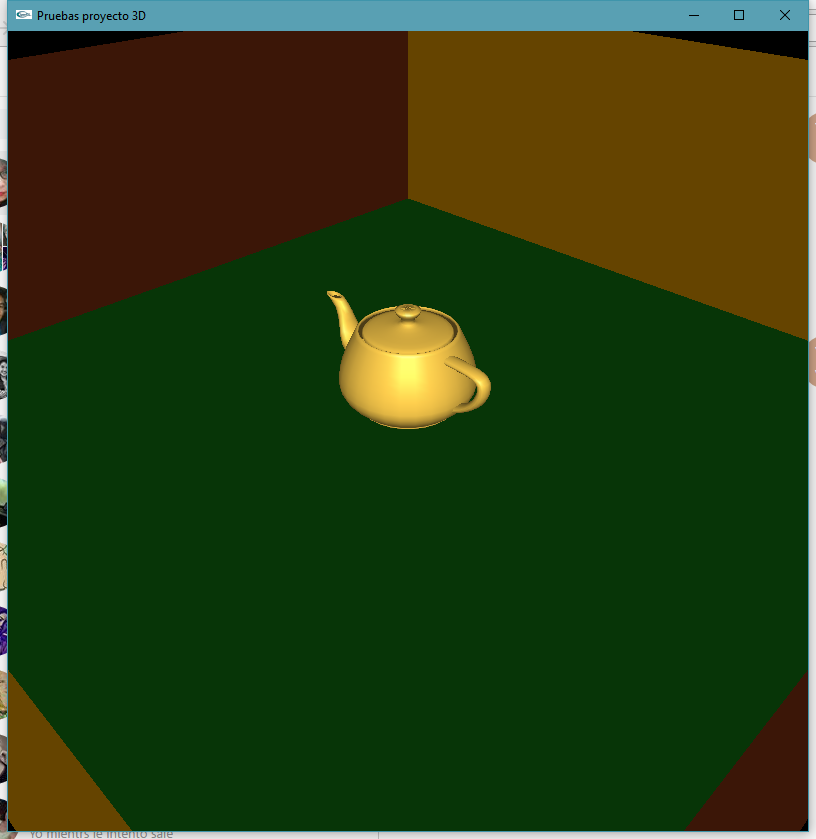
Después se realizaron pruebas de iluminación en un escenario con una tetera.
Por último se hizo un prototipo del personaje Hopmon y se realizó un prototipo del escenario.

Cronograma actualizado:

Boceto a mano:


Personaje Hopmon:


Pruebas de iluminación:


Prototipo del escenario:


lunes, 8 de mayo de 2017

Propuesta 2


Propuesta 2:
JUEGO HOPMON
Es un juego en el que se puede reutilizar el codigo del juego de PacaMan, adaptandolo ahora a las heramientas de 3D.

domingo, 30 de abril de 2017

Humanoide con materiales

Captura:


Código:
#include <windows.h>
#include <C:\GLUT\include\GL\glut.h>
#include <stdlib.h>
#include <stdio.h>
#include <math.h>

/** Descripcion: Humanoide con materiales
 *
 * Autores:
 *  Edgar Villa Miguel.
 * Fecha de creacion: 25/04/17
 * Revisiones: ---
 *  programa.
 * Fecha de ultima actualizacion: 30/04/17
 */

int angx = 0, angy = 0; // Con estas se esta rotando sobre el eje x y sobre el eje y

/* Prototipos de las funciones
    tipo-valor-retorno nombre-funcion ( lista-parametros )*/
void iluminacion (int encendido); // Establece el tipo de iluminación que se tendrá
void aplicarMaterialOro(int encendido); // Establece un material tipo oro para usarse
void aplicarMaterialLaton(int encendido); // Establece un material tipo latón para usarse
void display( void ); // Dibuja los elementos sobre la pantalla
void proy( unsigned char key, int x, int y); // Controla la interacción/respuesta entre el teclado y la ejecución del programa
void girar(int key, int x, int y); // Controla la interacción/respuesta entre el teclado y la ejecución del programa con teclas especiales


/**
 * Inicia la ejecución del programa
 */
int main(int argc, char **argv)
{
    glutInit(&argc, argv);

    glutInitDisplayMode(GLUT_SINGLE|GLUT_RGB|GLUT_DEPTH|GLUT_STENCIL);
    glutInitWindowSize( 400, 800);
    glutInitWindowPosition( 50, 50);
    glutCreateWindow ("Humanoide con materiales");

    /* 1.- La luz default es una luz direccional desde la camara */
    glEnable(GL_DEPTH_TEST); // Habilita un test de profundidad
    //glEnable(GL_LIGHTING); // Habilitar iluminacion
    //glEnable(GL_LIGHT0);

    glMatrixMode(GL_PROJECTION); // Se apila una proyección, indica que se va a tener un tipo de proyección y abajo se indica en el caso p y o
    glLoadIdentity();
    gluPerspective( 90, 0.5, 0.1, 100);

    glutDisplayFunc(display);
    glutKeyboardFunc(proy);
    glutSpecialFunc(girar);
    
    glMatrixMode(GL_MODELVIEW);
    glLoadIdentity();

    glutMainLoop();
    return 0;
}

/**
 * Estable el tipo de iluminación a usar
 * @param encendido Para activar/desactivar la iluminación
 */
void iluminacion (int encendido)
{
    if( encendido == 1 )
    {
        const GLfloat pos[4] = { 10, 10, 10}; //poner afuera
        static GLfloat colorLuz[] = { 1, 1, 1, 1}; // El 1 es como iluminacion global, como el sol, si es 0 es como un foquito creo
        // Lo anterior es una luz blanca

        glEnable(GL_LIGHTING);
        glEnable(GL_LIGHT0);
        glLightfv(GL_LIGHT0, GL_DIFFUSE, colorLuz); // La luz 0 va a ser difusa del color blanco, arriva
        glLightfv(GL_LIGHT0, GL_POSITION, pos);
    } else
    {
        glDisable(GL_LIGHTING);
    }
}

/**
 * Establece el tipo de material a usar, oro en este caso
 * @param encendido Para activar/desactivar el uso del material
 */
void aplicarMaterialOro(int encendido)
{
    if( encendido == 1 ) {
        GLfloat mat_green_ambient[] = { 0.24725,0.1995,0.0745,0.75};//ambiente y la ultima es alfa transaparencia
        GLfloat mat_green_diffuse[] = { 0.75164,0.60648,0.22648,0.75};//difuso
        GLfloat mat_specular[] = { 0.628281,0.555802,0.366065,0.5};//especular r,g,b y alfa
        GLfloat mat_shininess[] = { 0.4*128}; //128 mucho brillo y 0 poco brillo

        glMaterialfv(GL_FRONT, GL_SPECULAR, mat_specular); //se aplica solo en la cara frontal gl_front and back
        glMaterialfv(GL_FRONT, GL_SHININESS, mat_shininess);
        glMaterialfv(GL_FRONT, GL_AMBIENT, mat_green_ambient);
        glMaterialfv(GL_FRONT, GL_DIFFUSE, mat_green_diffuse);
    }
}

/**
 * Establece el tipo de material a usar, latón en este caso
 * @param encendido Para activar/desactivar el uso del material
 */
void aplicarMaterialLaton(int encendido) //es color verde esmeralda
{
    if(encendido==1) {
            //estos primeros son los parametros
        GLfloat mat_green_ambient[] = { 0.329412, 0.223529, 0,027451, 0.75};//ambiente y la ultima es alfa transaparencia
        GLfloat mat_green_diffuse[] = { 0.780392, 0.568627, 0.113725, 0.75};//difuso
        GLfloat mat_specular[] = { 0.992157, 0.941176, 0.807843, 0.5};//especular r,g,b y alfa
        GLfloat mat_shininess[] = { 0.21794872*128}; //128 mucho brillo y 0 poco brillo

        glMaterialfv(GL_FRONT, GL_SPECULAR, mat_specular); //se aplica solo en la cara frontal gl_front and back
        glMaterialfv(GL_FRONT, GL_SHININESS, mat_shininess);
        glMaterialfv(GL_FRONT, GL_AMBIENT, mat_green_ambient);
        glMaterialfv(GL_FRONT, GL_DIFFUSE, mat_green_diffuse);
    }
}

/**
 * Dibuja los elementos sobre la pantalla
 */
void display( void )
{
    glClear(GL_COLOR_BUFFER_BIT|GL_DEPTH_BUFFER_BIT); // Aqui solo se le limpia el buffer de pixeles, ahora tambien se debe de hacer el buffer de profundidad que es siguiente

    glColor3f( 0, 1, 0);
    iluminacion(1);
    glPushMatrix();
        glTranslatef( 0, 0.5, -4);
        glRotatef( angx, 1, 0, 0);
        glRotatef( angy, 0, 1, 0);

        // Cabeza
        glPushMatrix();
            aplicarMaterialOro(1);
            glTranslatef( 0, 2.1, 0);
            glScalef( 1, 1.2, 1 );
            glutSolidSphere( 0.6, 28, 28 );
        glPopMatrix();

        // Cuerpo
        glPushMatrix();
            glTranslatef( 0, 0.2, 0);
            glScalef( 1.2, 2.3, 0.8 );
            glutSolidSphere( 0.6, 28, 28 );
        glPopMatrix();

        // Hombro derecho
        glPushMatrix();
            glTranslatef( 0.55, 1.2, 0);
            glutSolidSphere( 0.21, 28, 28 );
        glPopMatrix();

        // Brazo derecho, vista usuario
        glPushMatrix();
            aplicarMaterialLaton(1);
            glTranslatef( 0.75, 0.73, 0);
            glRotatef( -75, 0, 0, 1 );
            glScalef( 4, 0.7, 0.7 );
            glutSolidCube( 0.28 );
        glPopMatrix();

        // Union con antebrazo derecho
        glPushMatrix();
            aplicarMaterialOro(1);
            glTranslatef( 0.86, 0.32, 0);
            glutSolidSphere( 0.21, 28, 28 );
        glPopMatrix();

        // Antebrazo derecho
        glPushMatrix();
            aplicarMaterialLaton(1);
            glTranslatef( 0.86, 0.0, 0);
            glScalef( 0.65, 2.8, 0.65 );
            glutSolidCube( 0.28 );
        glPopMatrix();

        // Mano derecha
        glPushMatrix();
            aplicarMaterialOro(1);
            glTranslatef( 0.86, -0.38, 0);
            glScalef( 1, 2, 1 );
            glutSolidSphere( 0.15, 28, 28 );
        glPopMatrix();

        // Hombro izquierdo ///////////////////////////
        glPushMatrix();
            glTranslatef( -0.55, 1.2, 0);
            glutSolidSphere( 0.21, 28, 28 );
        glPopMatrix();

        // Brazo izquierdo, vista usuario
        glPushMatrix();
            aplicarMaterialLaton(1);
            glTranslatef( -0.75, 0.73, 0);
            glRotatef( 75, 0, 0, 1 );
            glScalef( 4, 0.7, 0.7 );
            glutSolidCube( 0.28 );
        glPopMatrix();

        // Union con antebrazo izquierdo
        glPushMatrix();
            aplicarMaterialOro(1);
            glTranslatef( -0.86, 0.32, 0);
            glutSolidSphere( 0.21, 28, 28 );
        glPopMatrix();

        // Antebrazo izquierdo
        glPushMatrix();
            aplicarMaterialLaton(1);
            glTranslatef( -0.86, 0.0, 0);
            glScalef( 0.65, 2.8, 0.65 );
            glutSolidCube( 0.28 );
        glPopMatrix();

        // Mano izquierda
        glPushMatrix();
            aplicarMaterialOro(1);
            glTranslatef( -0.86, -0.38, 0);
            glScalef( 1, 2, 1 );
            glutSolidSphere( 0.15, 28, 28 );
        glPopMatrix();

        // Pierna izquierda /////////////////////////////
        glPushMatrix();
            glTranslatef( -0.45, -1, 0);
            glutSolidSphere( 0.26, 28, 28 );
        glPopMatrix();

        // Muslo izquierdo
        glPushMatrix();
            aplicarMaterialLaton(1);
            glTranslatef( -0.56, -1.6, 0);
            glRotatef( -6, 0, 0, 1);
            glScalef( 0.9, 3.2, 0.9);
            glutSolidCube( 0.32 );
        glPopMatrix();

        // Rodilla
        glPushMatrix();
            aplicarMaterialOro(1);
            glTranslatef( -0.62, -2.2, 0);
            glutSolidSphere( 0.23, 28, 28 );
        glPopMatrix();

        // Pantorrilla izquierda
        glPushMatrix();
            aplicarMaterialLaton(1);
            glTranslatef( -0.62, -2.6, 0);
            glScalef( 0.9, 3, 0.9);
            glutSolidCube( 0.32 );
        glPopMatrix();

        // Pie izquierdo
        glPushMatrix();
            aplicarMaterialOro(1);
            glTranslatef( -0.62, -3.35, 0);
            glRotatef( 90, 0, 1, 0 );
            glRotatef( -90, 1, 0, 0 );
            glutSolidCone( 0.32, 0.6, 28, 28 );
        glPopMatrix();


        // Pierna derecha /////////////////////////////
        glPushMatrix();
            glTranslatef( 0.45, -1, 0);
            glutSolidSphere( 0.26, 28, 28 );
        glPopMatrix();

        // Muslo derecho
        glPushMatrix();
            aplicarMaterialLaton(1);
            glTranslatef( 0.56, -1.6, 0);
            glRotatef( 6, 0, 0, 1);
            glScalef( 0.9, 3.2, 0.9);
            glutSolidCube( 0.32 );
        glPopMatrix();

        // Rodilla derecha
        glPushMatrix();
            aplicarMaterialOro(1);
            glTranslatef( 0.62, -2.2, 0);
            glutSolidSphere( 0.23, 28, 28 );
        glPopMatrix();

        // Pantorrilla derecha
        glPushMatrix();
            aplicarMaterialLaton(1);
            glTranslatef( 0.62, -2.6, 0);
            glScalef( 0.9, 3, 0.9);
            glutSolidCube( 0.32 );
        glPopMatrix();

        // Pie derecho
        glPushMatrix();
            aplicarMaterialOro(1);
            glTranslatef( 0.62, -3.35, 0);
            glRotatef( 90, 0, 1, 0 );
            glRotatef( -90, 1, 0, 0 );
            glutSolidCone( 0.32, 0.6, 28, 28 );
        glPopMatrix();

    glPopMatrix();
    glFlush();
}

/**
 * Controla la interacción/respuesta entre el teclado y la ejecución del programa
 * Parámetros necesarios y obligatorios
 * @param c Tecla que fue presionada del teclado, generada en código ASCII
 * @param x Coordenada x del mouse cuando fue presionada la tecla respectiva
 * @param y Coordenada y del mouse cuando fue presionada la tecla respectiva
 */
void proy( unsigned char key, int x, int y)
{
    glMatrixMode(GL_PROJECTION); // Se apila una proyección, indica que se va a tener un tipo de proyección y abajo se indica en el caso p y o
    glLoadIdentity();

    switch (key){
        case 27:
            exit(0);
        case 'p':
            gluPerspective( 90, 0.5, 0.1, 100); // zNear es como desde donde se coloca la camara o mira de la persona, mientras que zFar es hasta donde verá y por tanto cuantos objetos se veran
            break;
        case 'o':
            glOrtho( -2, 2, -4, 4, -2, 100);
            break;
    }

    /* 2.- Se agrega una matriz para la presentacion de un modelo */
    glMatrixMode(GL_MODELVIEW);
    glLoadIdentity();

    glutPostRedisplay();
}

/**
 * Controla la interacción/respuesta entre el teclado y la ejecución del programa con teclas especiales
 * Parámetros necesarios y obligatorios
 * @param c Tecla que fue presionada del teclado, generada en código ASCII
 * @param x Coordenada x del mouse cuando fue presionada la tecla respectiva
 * @param y Coordenada y del mouse cuando fue presionada la tecla respectiva
 */
void girar(int key, int x, int y)
{
    switch(key){
        case GLUT_KEY_UP:
            angx=angx+3;
            break;
        case GLUT_KEY_DOWN:
            angx=angx-3;
            break;
        case GLUT_KEY_LEFT:
            angy=angy+3;
            break;
        case GLUT_KEY_RIGHT:
            angy=angy-3;
            break;
    }

    glutPostRedisplay();
}

martes, 25 de abril de 2017

Cronograma y Propuesta del Proyecto

PROPUESTA DE PROYECTO: RECORRIDO VIRTUAL DE UNA PARTE DE MÉXICO

CubeMap - Caja de texturas

Capturas:


Código:
#include <windows.h>
#include <C:\GLUT\include\GL\glut.h>
#include <stdlib.h>
#include <stdio.h>
#include <string.h>
#include <math.h>

int alto=256,ancho=256;//dim imagen
GLfloat angle = 0;
GLfloat angle2 = 0;
int moving, startx, starty;


unsigned char * textura1;
unsigned char * textura2;
unsigned char * textura3;
unsigned char * textura4;
unsigned char * textura5;
unsigned char * textura6;

int leerImagen1(){
    FILE *imagen;
    imagen = fopen("C:/Users/migue/Dropbox/8vo Semestre/Graficación/3D/MapCubeFig/cMap1.raw","r");
    textura1 = (unsigned char*)malloc( ancho*alto*3 );
    if( imagen == NULL ){
        printf("Error: No imagen");
        return 0;
    }
    fread( textura1, ancho*alto*3, 1, imagen);
    fclose(imagen);
    return 1;
}

int leerImagen2(){
    FILE *imagen;
    imagen = fopen("C:/Users/migue/Dropbox/8vo Semestre/Graficación/3D/MapCubeFig/cMap2.raw","r");
    textura2 = (unsigned char*)malloc( ancho*alto*3 );
    if( imagen == NULL ){
        printf("Error: No imagen");
        return 0;
    }
    fread( textura2, ancho*alto*3, 1, imagen);
    fclose(imagen);
    return 1;
}

int leerImagen3(){
    FILE *imagen;
    imagen = fopen("C:/Users/migue/Dropbox/8vo Semestre/Graficación/3D/MapCubeFig/cMap3.raw","r");
    textura3 = (unsigned char*)malloc( ancho*alto*3 );
    if( imagen == NULL ){
        printf("Error: No imagen");
        return 0;
    }
    fread( textura3, ancho*alto*3, 1, imagen);
    fclose(imagen);
    return 1;
}

int leerImagen4(){
    FILE *imagen;
    imagen = fopen("C:/Users/migue/Dropbox/8vo Semestre/Graficación/3D/MapCubeFig/cMap4.raw","r");
    textura4 = (unsigned char*)malloc( ancho*alto*3 );
    if( imagen == NULL ){
        printf("Error: No imagen");
        return 0;
    }
    fread( textura4, ancho*alto*3, 1, imagen);
    fclose(imagen);
    return 1;
}

int leerImagen5(){
    FILE *imagen;
    imagen = fopen("C:/Users/migue/Dropbox/8vo Semestre/Graficación/3D/MapCubeFig/cMap5.raw","r");
    textura5 = (unsigned char*)malloc( ancho*alto*3 );
    if( imagen == NULL ){
        printf("Error: No imagen");
        return 0;
    }
    fread( textura5, ancho*alto*3, 1, imagen);
    fclose(imagen);
    return 1;
}

int leerImagen6(){
    FILE *imagen;
    imagen = fopen("C:/Users/migue/Dropbox/8vo Semestre/Graficación/3D/MapCubeFig/cMap6.raw","r");
    textura6 = (unsigned char*)malloc( ancho*alto*3 );
    if( imagen == NULL ){
        printf("Error: No imagen");
        return 0;
    }
    fread( textura6, ancho*alto*3, 1, imagen);
    fclose(imagen);
    return 1;
}

void usarTextura1(void)
{
    glTexParameteri(GL_TEXTURE_2D, GL_TEXTURE_MIN_FILTER, GL_NEAREST);
    glTexImage2D(GL_TEXTURE_2D, 0, GL_RGB, ancho, alto, 0, GL_RGB, GL_UNSIGNED_BYTE, textura1);
}


void usarTextura2(void)
{
    glTexParameteri(GL_TEXTURE_2D, GL_TEXTURE_MIN_FILTER, GL_NEAREST);
    glTexImage2D(GL_TEXTURE_2D, 0, GL_RGB, ancho, alto, 0, GL_RGB, GL_UNSIGNED_BYTE, textura2);
}


void usarTextura3(void)
{
    glTexParameteri(GL_TEXTURE_2D, GL_TEXTURE_MIN_FILTER, GL_NEAREST);
    glTexImage2D(GL_TEXTURE_2D, 0, GL_RGB, ancho, alto, 0, GL_RGB, GL_UNSIGNED_BYTE, textura3);
}


void usarTextura4(void)
{
    glTexParameteri(GL_TEXTURE_2D, GL_TEXTURE_MIN_FILTER, GL_NEAREST);
    glTexImage2D(GL_TEXTURE_2D, 0, GL_RGB, ancho, alto, 0, GL_RGB, GL_UNSIGNED_BYTE, textura4);
}


void usarTexturaBase(void)
{
    glTexParameteri(GL_TEXTURE_2D, GL_TEXTURE_MIN_FILTER, GL_NEAREST);
    glTexImage2D(GL_TEXTURE_2D, 0, GL_RGB, ancho, alto, 0, GL_RGB, GL_UNSIGNED_BYTE, textura5);
}


void usarTexturaTapa(void)
{
    glTexParameteri(GL_TEXTURE_2D, GL_TEXTURE_MIN_FILTER, GL_NEAREST);
    glTexImage2D(GL_TEXTURE_2D, 0, GL_RGB, ancho, alto, 0, GL_RGB, GL_UNSIGNED_BYTE, textura6);
}


// cubemap variables
int d1 = 10;
int d2 = 20;
static GLint verticesPiso[4][3] = {
    { -d1, 0,  -d1 },
    {  d1, 0,  -d1 },
    {  d1, 0, d1 },
    { -d1, 0, d1 },
};
static GLint pared1Vertices[4][3] = {
    { -d1,d2, d1},
    { -d1,0,  d1},
    {  d1,0,  d1},
    {  d1,d2, d1},
};
static GLint pared2Vertices[4][3] = {
    { d1,d2, d1},
    { d1,0,  d1},
    { d1,0, -d1},
    { d1,d2,-d1},
};
static GLint pared3Vertices[4][3] = {

    {  d1,d2,-d1 },
    { d1,0,-d1 },
    { -d1,0,-d1 },
    {  -d1,d2,-d1},
};
static GLint pared4Vertices[4][3] = {
    { -d1,d2,-d1},
    { -d1,0,-d1 },
    {  -d1,0,d1 },
    {  -d1,d2,d1},
};
static GLint techoVertices[4][3] = {
    { d1,d2,-d1},
    { -d1,d2,-d1 },
    {  -d1,d2,d1 },
    {  d1,d2,d1},
};


void dibujaBase(void)
{
    usarTexturaBase();
    glBegin(GL_QUADS);
    glTexCoord2f( 0.0, 0.0); // esta dibuja la textura sobre lo siguiente
    glVertex3iv(verticesPiso[0]);
    glTexCoord2f(0.0, 1);
    glVertex3iv(verticesPiso[1]);
    glTexCoord2f(1, 1);
    glVertex3iv(verticesPiso[2]);
    glTexCoord2f(1, 0.0);
    glVertex3iv(verticesPiso[3]);
    glEnd();
}
void dibujaPared1c(void)
{
    usarTextura1();
    glBegin(GL_QUADS);
    glTexCoord2f(0.0, 0.0);
    glVertex3iv(pared1Vertices[0]);
    glTexCoord2f(0.0, 1.0);
    glVertex3iv(pared1Vertices[1]);
    glTexCoord2f(1.0, 1.0);
    glVertex3iv(pared1Vertices[2]);
    glTexCoord2f(1.0, 0.0);
    glVertex3iv(pared1Vertices[3]);
    glEnd();
}
void dibujaPared2c(void)
{
    usarTextura2();
    glBegin(GL_QUADS);
    glTexCoord2f(0.0, 0.0);
    glVertex3iv(pared2Vertices[0]);
    glTexCoord2f(0.0, 1.0);
    glVertex3iv(pared2Vertices[1]);
    glTexCoord2f(1.0, 1.0);
    glVertex3iv(pared2Vertices[2]);
    glTexCoord2f(1.0, 0.0);
    glVertex3iv(pared2Vertices[3]);
    glEnd();
}

void dibujaPared3c(void)
{
    usarTextura3();
    glBegin(GL_QUADS);
    glTexCoord2f(0.0, 0.0);
    glVertex3iv(pared3Vertices[0]);
    glTexCoord2f(0.0, 1.0);
    glVertex3iv(pared3Vertices[1]);
    glTexCoord2f(1.0, 1.0);
    glVertex3iv(pared3Vertices[2]);
    glTexCoord2f(1.0, 0.0);
    glVertex3iv(pared3Vertices[3]);
    glEnd();
}

void dibujaPared4c(void)
{
    usarTextura4();
    glBegin(GL_QUADS);
    glTexCoord2f(0.0, 0.0);
    glVertex3iv(pared4Vertices[0]);
    glTexCoord2f(0.0, 1.0);
    glVertex3iv(pared4Vertices[1]);
    glTexCoord2f(1.0, 1.0);
    glVertex3iv(pared4Vertices[2]);
    glTexCoord2f(1.0, 0.0);
    glVertex3iv(pared4Vertices[3]);
    glEnd();
}

void dibujaTapac(void)
{
    usarTexturaTapa();
    glBegin(GL_QUADS);
    glTexCoord2f(0.0, 0.0);
    glVertex3iv(techoVertices[0]);
    glTexCoord2f(0.0, 1.0);
    glVertex3iv(techoVertices[1]);
    glTexCoord2f(1.0, 1.0);
    glVertex3iv(techoVertices[2]);
    glTexCoord2f(1.0, 0.0);
    glVertex3iv(techoVertices[3]);
    glEnd();
}
//////////////////////////////////////////////////

void display(void)
{

    glClear(GL_COLOR_BUFFER_BIT | GL_DEPTH_BUFFER_BIT | GL_STENCIL_BUFFER_BIT); // El ultimo del buffer STENCIL

    glPushMatrix();
        glRotatef(angle2, 1.0, 0.0, 0.0); //move mouse
        glRotatef(angle, 0.0, 1.0, 0.0);

        glPushMatrix();
            glTranslatef(0,-10, 0); // El -10 es porque el cubo se hizo a patir desde la base
            dibujaBase();
            dibujaPared1c();
            dibujaPared2c();
            dibujaPared3c();
            dibujaPared4c();
            dibujaTapac();
        glPopMatrix();

    glPopMatrix();
glutSwapBuffers();
}

void mouse(int button, int state, int x, int y)
{
    if (button == GLUT_LEFT_BUTTON) {
        if (state == GLUT_DOWN) {
            moving = 1;
            startx = x;
            starty = y;
        }
        if (state == GLUT_UP) {
            moving = 0;
        }
    }
}

void mover(int x, int y)
{
    if (moving) {
        angle = angle + (x - startx);
        angle2 = angle2 + (y - starty);
        startx = x;
        starty = y;
        glutPostRedisplay();
    }
}

int main(int argc, char **argv)
{
    glutInit(&argc, argv);
    glutInitDisplayMode(GLUT_RGB | GLUT_DOUBLE | GLUT_DEPTH | GLUT_STENCIL | GLUT_MULTISAMPLE);

    glutInitWindowSize( 480, 360);

    glutCreateWindow("CAJA TEXTURAS");

    leerImagen1();
    leerImagen2();
    leerImagen3();
    leerImagen4();
    leerImagen5();
    leerImagen6();

    glutDisplayFunc(display);
    glutMouseFunc(mouse);
    glutMotionFunc(mover);

    glEnable(GL_DEPTH_TEST);//////////HABILITAR
    glEnable(GL_TEXTURE_2D);

    gluPerspective(40.0,1.333,0.1,200.0); //16/10=1.6   5/4=1.25        1.333 porque la resolucion es de 640x480
    glMatrixMode(GL_MODELVIEW);

    /* El primero para posicionar la camara, el siguiente es para decir hacia donde ve la camara, el ultimo es para cambiar la posicion u orientacion de la camara  */
    gluLookAt(0.0, 0.0, 10.0,  /* camara en (0,20,60) */
              0,0,0,          /* mira a (x,y,z) */
              0, 1, 0);      /* altura en Y (0,1,0) o en x Y (1,0,0) */

    glutMainLoop();
    return 0;
}